Mini PC vs Tower PC: Which Suits Your Home Desk? (November 2026)
Choose a mini PC when desk space matters; choose a tower when you want a traditional case and included keyboard and mouse. The right fit depends on your room, workload and plans to expand.
On this page (8 sections)
- Mini PC vs Tower PC: Which Suits Your Home Desk?
- Mini PC vs tower PC: which fits a home desk?
- Which computer suits everyday home tasks?
- How do the ports and monitor options compare?
- Which is easier to upgrade or maintain?
- Which computer works better for demanding tasks?
- Which of these computers fits each buyer?
- What should you choose: a mini PC or tower?
Mini PC vs Tower PC: Which Suits Your Home Desk?
Choose a mini PC when desk space matters; choose a tower when you want a traditional case and included keyboard and mouse. The mini PC vs tower PC choice also depends on the work you do, the connections you need and whether you may want to change parts later.
A mini PC can sit beside a monitor or out of the way, while a tower usually stands under or beside the desk. Neither shape guarantees better performance, so compare the specifications of the computers you're considering.
The GMKtec M6 Ultra offers 32GB of memory and a 1TB SSD in a mini PC. The HP Desktop Tower 290 G9 has 8GB of memory, a 256GB SSD, and includes a keyboard and mouse.


Mini PC vs tower PC: which fits a home desk?
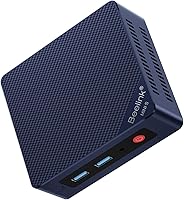
A mini PC takes less room than a tower case. That makes it a natural choice for a small desk, shared work area or setup where you want the computer out of sight.
The GMKtec M6 Ultra measures about 4.4 inches across and 1.7 inches high, according to its listed dimensions. The HP tower measures 11.92 x 6.1 x 13.27 inches, so it needs a taller space under or beside the desk.
The GEEKOM A6 is another compact option, at about 4.4 inches square and 2.05 inches high. Keep room around any computer for its cables and ventilation, and follow the maker's setup guidance.
How much desk space does a mini PC save?
A mini PC can free up the area beneath a monitor that a tower would occupy. You could also mount a compatible mini PC behind a display, as the GEEKOM A6 includes a VESA mount.
That compact size brings some tradeoffs. A mini PC won't give you the same large case to open or the same room for expansion as a conventional tower may offer.
Measure where the computer will sit, including access to its power button and ports. If you want to keep the computer completely out of sight, check how you'll reach it and route its power and display cables.
Which computer suits everyday home tasks?
Either form can suit common home tasks, but the exact memory, storage and processor matter more than the case shape. Browsing, email, documents and video calls don't require everyone to buy the same type of desktop.
The HP tower pairs an Intel Core i3-13100 processor with 8GB of memory and a 256GB SSD. HP describes it for everyday office tasks, including email, web browsing and office applications.
The GMKtec M6 Ultra has an AMD Ryzen 5 7640HS processor, 32GB of DDR5 memory and a 1TB SSD. Its higher memory and storage figures may suit someone who keeps many programs and files on the computer.
For everyday home use, start with the programs you run and how much local storage you need. Our guide to mini computers for everyday home use compares the needs of a typical household.
Which mini PC vs tower setup suits multitasking?
The GMKtec M6 Ultra has 32GB of memory installed, compared with 8GB in the HP tower. More memory can help when you keep many applications or browser tabs open, though performance still depends on the software and other parts of the system.
The GEEKOM A6 starts with 16GB of DDR5 memory and supports an upgrade to 64GB. That gives you a stated upgrade path if your workload grows, but changing memory takes time and may involve extra cost.
If your home work includes large spreadsheets, many browser tabs or several screens, compare the whole configuration. A compact case doesn't prevent a mini PC from being well equipped, and a tower shape doesn't guarantee generous memory or storage.
How do the ports and monitor options compare?
Choose by the screens and accessories you already own, then confirm that the exact computer has matching ports. Mini PCs can support several displays, while a tower may offer a mix of modern and older connections.
The GMKtec M6 Ultra supports up to 3 simultaneous displays. Its connections include HDMI 2.0, DisplayPort and USB4, while the HP tower includes HDMI and VGA outputs.
The GEEKOM A6 supports up to 4 4K monitors and has dual HDMI plus USB4. That may be useful for a multi-screen workspace, but check the connections and display limits for your screens before setting up.
Our mini PC dual monitor support guide explains how to match ports, cables and screens. If your desk needs just one monitor, a large display setup may not be a useful reason to pay for extra outputs.
Does a tower PC make connections easier?
The HP tower's HDMI and VGA ports cover modern displays and some older monitors. It also has USB ports, Wi-Fi and Gigabit Ethernet, which can help if you want wired network access.
A mini PC can offer a similarly useful range of connections, but port layouts differ by model. The GMKtec M6 Ultra includes USB-A, HDMI, DisplayPort, USB4, a headphone and microphone jack, and two 2.5G Ethernet ports.
Count the devices you plan to connect: monitor, keyboard, mouse, webcam, storage and network cable. Check whether you'll need a hub or adapter, and confirm that it supports the connections your devices use.
Which is easier to upgrade or maintain?
A tower usually gives you more physical room to work, while some mini PCs still allow memory and storage upgrades. Check the model's limits before assuming either computer can grow with your needs.
The GMKtec M6 Ultra supports memory expansion up to 128GB and has dual storage slots. The GEEKOM A6 supports memory up to 64GB, and its maker describes its memory and SSD as upgradeable.
The product details for the HP tower don't specify a memory upgrade limit or expansion slots. If upgrades matter to you, confirm the supported parts and service steps for the exact model before buying.
A larger case may be easier to open, but it doesn't guarantee that a particular component is replaceable. Likewise, a mini PC can be serviceable even though its small case leaves less space for hands and tools.
For more context on performance and upgrade tradeoffs, read whether a mini PC is as good as a desktop. That guide can help you decide whether the compact format meets your expectations.
Which computer works better for demanding tasks?
Match the computer to the software and graphics workload you plan to run. Don't assume a tower will be faster simply because it is larger, or that a mini PC will suit heavy work because its processor has a high-end name.
The GMKtec M6 Ultra lists Radeon 760M integrated graphics, and the GEEKOM A6 lists Radeon 680M integrated graphics. Those models are described for moderate gaming and creative tasks, but actual results depend on the game or application and its settings.
The HP tower lists Intel UHD Graphics 730 integrated graphics. HP positions the computer for office work, so it may suit documents and routine business tasks better than a buyer seeking a graphics-focused system.
If editing family videos or photos is part of your plan, compare the requirements of your software with the specific processor, memory and graphics. Our guides to mini PCs for photo editing and mini PCs for video editing cover those use cases.
Which of these computers fits each buyer?
Pick the GMKtec M6 Ultra for a small desk with 32GB of memory, the HP tower for an office setup with a keyboard and mouse included, or the GEEKOM A6 for a compact multi-screen workstation. These are different configurations, so use your needs to decide which tradeoffs suit you.
The GMKtec M6 Ultra pairs a compact footprint with 32GB of memory, a 1TB SSD and support for 3 displays. It may fit a busy home desk where screen count and memory matter.
The HP Desktop Tower 290 G9 has a traditional case, 8GB of memory, a 256GB SSD, Wi-Fi and Gigabit Ethernet. Its included wired keyboard and mouse make it a practical starting point for basic office work.
The GEEKOM A6 combines a compact footprint with 16GB of memory, a 1TB SSD and support for up to 4 4K monitors. Its memory can be upgraded to 64GB, which may appeal if you want a small system with an upgrade option.
If you're still weighing whether the smaller format fits your routine, see who should buy a mini PC. Choose the tower if its traditional case and included accessories matter more than saving desk space.
What should you choose: a mini PC or tower?
Choose a mini PC for a small desk and a tower when you prefer a larger case and the HP's included keyboard and mouse. Compare processor, memory, storage, display ports and upgrade options before deciding.
The GMKtec M6 Ultra fits a compact setup with 32GB of memory and three-display support. The HP tower suits basic office work with a traditional case, while the GEEKOM A6 offers a compact path to four displays and memory upgrades.
Compare the best mini desktop computers if you want to see more compact options before you choose.
Frequently asked questions
Is a mini PC better than a tower PC?
A mini PC is better when you want a compact computer that takes little desk space, while a tower is better when you prefer a traditional case and may want room for future changes. Compare the exact models, since ports, memory and included accessories vary.
Can a mini PC handle everyday home use?
Yes, many mini PCs can handle browsing, email, streaming and office tasks, depending on their processor and memory. Check the configuration for your workload, and consider a tower or a higher-spec mini PC if you run demanding software.
Does a tower PC include a monitor?
A desktop tower normally refers to the computer case, so don't assume a monitor is included. The HP Desktop Tower 290 G9 includes a wired keyboard and mouse, but its listed package does not include a monitor.
Can a mini PC use two monitors?
Some mini PCs can run two or more monitors, but support depends on their ports and display limits. Check the exact model and your monitor connections before buying; our mini PC dual monitor guide explains how to match ports and cables.
Which is easier to upgrade, a mini PC or a tower?
A tower is often easier to work inside because it has a larger case, but the parts you can change depend on its design. Some mini PCs also allow memory or storage upgrades, so check the exact model's supported parts before you decide.