8 Best Mini PCs for Photo Editing at Home (November 2026)
The best mini PCs for photo editing include the GEEKOM A8 mini PC for demanding photo work, the GMKtec M6 Ultra mini PC (32GB) for a roomy starting setup, and the GEEKOM A6 mini PC for a flexible home desk.
On this page (4 sections)
The best mini PC for photo editing at home is the GEEKOM A8, with Radeon 780M integrated graphics, 16GB of upgradeable memory and a 1TB SSD. For 32GB already installed, consider the Minisforum UM870 Slim or GMKtec M6 Ultra.
A compact computer can suit a home photo desk when its memory, graphics and storage match your software and image library. These picks all use integrated graphics, so check your editor's requirements if your workflow depends on a specific GPU feature.
For a broader starting point, see our guide to the best mini desktop computers. If editing is one part of a shared family setup, compare it with our picks for everyday home use.
Our picks at a glance
-
1

-
2

-
3

How we chose mini PCs for photo editing
The best mini PC for photo editing balances processor, integrated graphics, memory, storage and display support for your kind of work. We compared those features and how well each configuration fits common home editing needs.
Memory matters when you edit large files or keep a browser, file manager and other tools open. A 32GB configuration offers more headroom at the start, while upgradeable memory gives you a path to expand later.
Storage affects how many applications and active image files can stay on the computer. A 1TB SSD appears on most of these picks; the A7 has 500GB and the S3A has 512GB, so consider where your photo archive and backups will live.
Graphics and display connections also shape a desk setup. These computers use integrated graphics, and the picks include support for multiple displays, but port combinations and maximum display counts vary.
| Product | Best for | Processor | Memory | Storage | Our score |
|---|---|---|---|---|---|
| GEEKOM A8 mini PC | demanding photo work | Ryzen 7 8745HS | 16GB DDR5, upgradeable to 128GB | 1TB PCIe 4.0 NVMe SSD | 9.1 |
| GMKtec M6 Ultra mini PC (32GB) | a roomy starting setup | Ryzen 5 7640HS | 32GB DDR5 | 1TB SSD | 8.9 |
| GEEKOM A6 mini PC | a flexible home desk | Ryzen 7 6800H | 16GB DDR5, upgradeable to 64GB | 1TB PCIe 4.0 NVMe SSD | 8.8 |
| Minisforum UM870 Slim mini PC | 32GB and three displays | Ryzen 7 8745H | 32GB DDR5, upgradeable to 96GB | 1TB PCIe 4.0 SSD | 8.6 |
| GEEKOM A7 mini PC (32GB) | lower-power editing | Ryzen 7 7730U | 32GB | 500GB PCIe Gen4 SSD | 8.3 |
| Bosgame P3 Plus mini PC | creative multitasking | Ryzen 7 7840HS | 16GB DDR5, upgradeable to 64GB | 1TB PCIe 4.0 NVMe SSD | 8.1 |
| ACEMAGIC S3A mini PC | three-screen work | Ryzen 7 H 255 | 16GB LPDDR5 | 512GB PCIe 4.0 SSD | 8.0 |
| Kamrui Pinova P2 mini PC (32GB) | memory-heavy multitasking | Intel Core i5-12600H | 32GB LPDDR5 | 1TB NVMe SSD | 7.9 |
Which mini PC fits your photo editing workflow?
The GEEKOM A8 is the strongest all-around fit here, while the other models trade graphics, memory, storage and display support in different ways. Match those tradeoffs to the photo files you edit and the number of apps you use at once.
GEEKOM A8 mini PC: Best for demanding photo work
- Ryzen 7 8745HS
- Radeon 780M integrated graphics
- 16GB DDR5 upgradeable to 128GB
- 1TB PCIe 4.0 SSD
Radeon 780M graphics, upgradeable memory and a 1TB SSD make the A8 a strong fit for a home photo workflow with large files and several apps open.
Pros
- Radeon 780M integrated graphics
- Memory upgrades up to 128GB
- VESA mount included
Cons
- Starts with 16GB of memory
- No dedicated graphics card
The GEEKOM A8 pairs a Ryzen 7 8745HS processor with Radeon 780M integrated graphics. Its 16GB DDR5 memory can be upgraded to 128GB, and its 1TB PCIe 4.0 SSD provides a roomy starting point for apps and active files.
GEEKOM also includes a VESA mount, so the compact 0.5-liter chassis can sit behind a compatible monitor. The A8 supports Wi-Fi 6E and 2.5GbE LAN for wired or wireless network access.
This pick makes sense if you want a fast processor, 780M graphics and room to expand memory later. It still uses integrated graphics, so check whether your editor's GPU requirements fit before you buy.
GMKtec M6 Ultra mini PC (32GB): Best for a roomy starting setup
- Ryzen 5 7640HS
- Radeon 760M integrated graphics
- 32GB DDR5
- 1TB SSD
The 32GB configuration gives photo apps and other desktop tasks more memory to share. Its Radeon 760M graphics and 1TB SSD suit a broad home editing setup.
Pros
- 32GB DDR5 installed
- Expandable memory up to 128GB
- Triple display support
Cons
- Radeon 760M rather than 780M graphics
- No dedicated graphics card
The GMKtec M6 Ultra gives you 32GB of DDR5 memory and a 1TB SSD in its listed configuration. Its Ryzen 5 7640HS processor and Radeon 760M integrated graphics support a capable home workstation, while the memory can be expanded up to 128GB.
Three display outputs allow a multi-screen setup, including HDMI 2.0, DisplayPort and USB4. That can help keep the editing canvas, file browser and reference material visible at once.
Choose it if you prefer 32GB installed before you start and want multiple display connections. Its Radeon 760M is a step away from the 780M options in this roundup, so compare your editing software's GPU needs.
GEEKOM A6 mini PC: Best for a flexible home desk
- Ryzen 7 6800H
- Radeon 680M integrated graphics
- 16GB DDR5 upgradeable to 64GB
- 1TB PCIe 4.0 SSD
The A6 pairs a 1TB SSD with upgradeable memory and supports up to four 4K monitors, which can help organize editing tools and reference images.
Pros
- Memory upgrades up to 64GB
- 1TB PCIe 4.0 SSD
- Dual HDMI and USB4
Cons
- Starts with 16GB of memory
- Radeon 680M integrated graphics
The GEEKOM A6 combines a Ryzen 7 6800H processor, Radeon 680M integrated graphics and a 1TB PCIe 4.0 SSD. Its 16GB of DDR5 memory can be expanded to 64GB, giving you a way to add headroom if your projects grow.
The A6 supports up to four 4K monitors through USB4, dual HDMI and USB 3.2. That setup can be useful if you edit on one screen and keep folders or reference images on another.
Pick it if you want a 1TB drive, upgradeable memory and several display connections. For a wider look at a similar creative workload, read our guide to mini PCs for video editing.
Minisforum UM870 Slim mini PC: Best for 32GB and three displays

- Ryzen 7 8745H
- Radeon 780M integrated graphics
- 32GB DDR5 upgradeable to 96GB
- 1TB PCIe 4.0 SSD
This configuration combines Radeon 780M graphics with 32GB of memory and supports three displays, a useful mix for editing with multiple windows open.
Pros
- 32GB DDR5 installed
- Memory upgrades up to 96GB
- Three display outputs
Cons
- No dedicated graphics card
- Expansion options may need planning
The Minisforum UM870 Slim starts with 32GB of DDR5 memory, a Ryzen 7 8745H and Radeon 780M integrated graphics. Its memory can be expanded to 96GB, while the 1TB PCIe 4.0 SSD can be paired with another drive.
It supports three displays through HDMI, USB4 and DisplayPort. The combination of 32GB out of the box and 780M graphics makes it a good match for larger editing sessions with several windows open.
Choose the UM870 Slim if you want 32GB installed without giving up Radeon 780M graphics. Check your monitor inputs and the available ports before planning a three-screen desk.
GEEKOM A7 mini PC (32GB): Best for lower-power editing

- Ryzen 7 7730U
- Integrated AMD Radeon graphics
- 32GB memory
- 500GB PCIe Gen4 SSD
The A7 combines 32GB of memory with an efficient 15W processor and integrated Radeon graphics. Its 500GB SSD may call for added storage if you keep a large photo library on the computer.
Pros
- 32GB memory installed
- 15W TDP processor
- Storage expandable up to 4TB
Cons
- 500GB SSD is the smallest listed here
- Integrated Radeon graphics
The GEEKOM A7 starts with 32GB of memory and a 500GB PCIe Gen4 SSD. Its Ryzen 7 7730U processor uses a stated 15W TDP, and integrated Radeon graphics support photo editing and multi-display work.
GEEKOM says the A7's memory can be upgraded to 64GB and its storage to 4TB. The dual HDMI and dual USB-C ports provide options for monitors and accessories.
Consider it if you want 32GB installed and an efficient processor for everyday home work alongside photo editing. Its 500GB SSD is the smallest capacity in this group, so plan where your original files and backups will go.
Bosgame P3 Plus mini PC: Best for creative multitasking

- Ryzen 7 7840HS
- Radeon 780M integrated graphics
- 16GB DDR5
- 1TB PCIe 4.0 NVMe SSD
The P3 Plus has Radeon 780M graphics and a 1TB SSD, with room to add memory or a second SSD as a photo archive grows.
Pros
- Radeon 780M integrated graphics
- Memory upgrades up to 64GB
- Second SSD expansion
Cons
- Starts with 16GB of memory
- 1-year warranty
The Bosgame P3 Plus pairs a Ryzen 7 7840HS processor with Radeon 780M integrated graphics, 16GB of DDR5 memory and a 1TB PCIe 4.0 SSD. Its memory can be upgraded to 64GB, and it has room for a second SSD.
The P3 Plus supports up to three monitors through HDMI, DisplayPort and USB-C. That leaves flexibility for a main editing screen plus space for file browsing or reference material.
Choose it if you want a 1TB drive with expansion options for both memory and storage. It starts with 16GB of RAM, so consider adding memory if your editing workflow regularly keeps large files and other apps open.
ACEMAGIC S3A mini PC: Best for three-screen work

- Ryzen 7 H 255
- Radeon 780M integrated graphics
- 16GB LPDDR5
- 512GB PCIe 4.0 SSD
The S3A supports three 4K displays through HDMI, DisplayPort and USB4. Its 512GB SSD is a consideration if you plan to keep many original image files on the computer.
Pros
- Radeon 780M integrated graphics
- Three 4K display support
- Storage expandable up to 4TB
Cons
- 16GB LPDDR5 memory
- 512GB SSD
The ACEMAGIC S3A has a Ryzen 7 H 255 processor, Radeon 780M integrated graphics, 16GB of LPDDR5 memory and a 512GB PCIe 4.0 SSD. Its storage can be expanded up to 4TB.
HDMI, DisplayPort and USB4 support up to three 4K displays. The S3A also has three performance modes, including a silent mode that ACEMAGICIAN says runs at 35dB.
This pick suits a desk built around three screens and a compact computer. The 512GB drive and 16GB of memory are worth considering if you work with large photo libraries or several creative apps at once.
Kamrui Pinova P2 mini PC (32GB): Best for memory-heavy multitasking
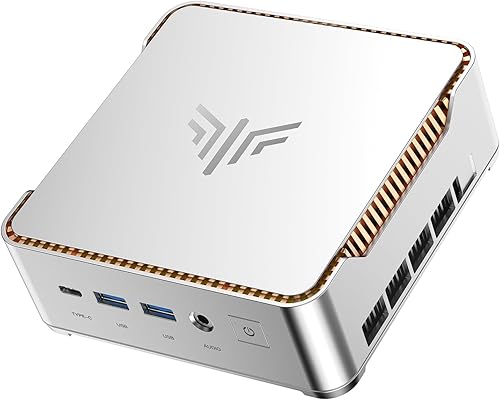
- Intel Core i5-12600H
- Intel Iris Xe integrated graphics
- 32GB LPDDR5
- 1TB NVMe SSD
The Pinova P2 offers 32GB of memory and a 1TB SSD for editing alongside other apps. Its Intel Iris Xe integrated graphics make it a different option from the Radeon 780M picks.
Pros
- 32GB LPDDR5 installed
- 1TB NVMe SSD
- Triple 4K display support
Cons
- Intel Iris Xe integrated graphics
- No dedicated graphics card
The Kamrui Pinova P2 combines a Core i5-12600H processor with Intel Iris Xe integrated graphics, 32GB of LPDDR5 memory and a 1TB NVMe SSD. It supports up to three 4K displays through HDMI, DisplayPort and USB-C.
Its 32GB configuration gives you more memory to share between an editor and other open applications. Two storage slots support additional storage, with the stated total capacity reaching up to 4TB.
Choose it if memory and a 1TB SSD matter more to you than matching the Radeon 780M graphics found in several other picks. Check your editor's graphics requirements and confirm compatibility with the Iris Xe GPU.
What should you check before buying a mini PC for photo editing?
Check your editing software's requirements, image file sizes, memory needs, storage plan and monitor connections before you choose. A spec that sounds strong on its own may not match a particular editor or desk.
How much memory will your photo editor use?
For photo editing with other apps open, 32GB gives you more room than 16GB. A 16GB model can still be a fit for a lighter workflow, especially if its memory is upgradeable and you can add capacity later.
Some products use different memory types and upgrade paths, so confirm the configuration you intend to buy. The best mini PCs with 32GB of memory can help you compare ready-to-use 32GB options.
Is integrated graphics enough for your editing software?
Integrated graphics may be suitable for your editor's standard photo tools, but software features vary. Review the requirements for GPU acceleration, effects and display output before choosing among Radeon 780M, Radeon 680M, Radeon 760M or Intel Iris Xe graphics.
None of the picks here has a dedicated graphics card. If a required feature calls for a specific GPU capability, use that requirement as your filter.
How much SSD space do you need?
A 1TB SSD leaves more working room than a 500GB or 512GB drive, but it may not hold a large photo archive and every backup. Decide which files stay on the mini PC and which will live on an external or network drive.
Storage expansion differs by model. Check the listed drive support and whether adding storage fits your budget and setup plans.
Will it connect to your monitor?
Most of these mini PCs offer several ways to connect screens, but the number of displays and port types vary. Match HDMI, DisplayPort or USB-C output to your monitor inputs, and confirm the resolution you plan to use.
If you also edit video or family clips, our guide to mini PCs for video editing covers that related workload. It can help you decide whether your editing needs call for a different balance of processor and graphics.
Which mini PC should you choose for photo editing?
Choose the GEEKOM A8 for the strongest mix of Ryzen 7 processing, Radeon 780M graphics, a 1TB SSD and expandable memory. Pick the UM870 Slim if you want 32GB installed with 780M graphics, or the M6 Ultra if a 32GB starting setup and triple displays are your priorities.
For lighter work with 32GB installed, the GEEKOM A7 combines an efficient 15W processor with a 500GB SSD. Compare the software requirements, photo storage plan and monitor connections before choosing the best mini PC for photo editing at home.
Our top 3 picks at a glance
-
1
-
2
-
3
Frequently asked questions
How much memory does a mini PC need for photo editing?
For a home photo workflow, 16GB is a reasonable starting point, while 32GB gives editing software and other open apps more room. The A8 and A6 let you upgrade their memory, and the M6 Ultra, UM870 Slim and A7 listed here start with 32GB.
Check the requirements for your photo editor and the size of your image files before choosing.
Is integrated graphics enough for photo editing?
Integrated graphics can suit many photo editing tasks, and every mini PC in this guide uses integrated graphics. Several have Radeon 780M graphics, while the A6 uses Radeon 680M, the M6 Ultra uses Radeon 760M, and the Pinova P2 uses Intel Iris Xe.
If your workflow relies on specific GPU features, check your software's requirements.
How much storage should a photo editing mini PC have?
A 1TB SSD gives you more room for applications and active image files than the 500GB and 512GB options in this group. Your long-term need depends on image size, how many originals you keep locally and whether you use external or network storage.
Plan for backups as well as working space.
Can a mini PC run two photo editing monitors?
Yes. The picks here support multiple displays, with several supporting three or more screens and the GEEKOM A6 supporting up to four 4K monitors.
Before buying, match the computer's ports to your monitors and check that your chosen resolution and refresh rate are supported.


