8 Best Mini PCs for Video Editing (November 2026)
The best mini PCs for video editing and family videos include the GEEKOM A8 mini PC for 4K editing, the Minisforum UM880 Plus mini PC for large project files, and the GMKtec M6 Ultra mini PC (32GB) for family video libraries.
On this page (5 sections)
The best mini PC for video editing is the GEEKOM A8 for its Ryzen 7 8745HS processor, Radeon 780M graphics and upgradeable memory. For family videos, consider the GMKtec M6 Ultra if you want 32GB of memory included, or the Minisforum UM880 Plus if you also want expandable storage.
A small computer can suit home editing if its processor, memory and storage match the footage and editing software you use. For a wider look at choosing a compact computer, see our best mini desktop computers guide.
Our picks at a glance
-
1

-
2
-
3

How we chose mini PCs for video editing
We compared the listed processors, graphics, memory, storage and display connections against common home editing needs. Our score weighs specs, features and buyer feedback against what you're shopping for.
For family videos, a 1TB SSD offers useful starting space, but it is not a complete archive plan. Keep original footage backed up separately, especially if the clips matter to your family.
The main tradeoff is between ready-to-use memory and room to upgrade. Models with 32GB can handle more background work from the start, while upgradeable 16GB systems give you a path to expand later.
The GEEKOM A8 leads this group because it combines a Ryzen 7 8745HS, Radeon 780M graphics, a 1TB SSD and memory upgrades up to 128GB. The Minisforum UM880 Plus and GMKtec M6 Ultra are strong alternatives when 32GB of memory matters more at setup.
Compare the best mini PCs for video editing
The table highlights the parts that most affect an editing setup: processor, memory and storage. Check your editing app's system requirements and display needs before you choose.
| Product | Best for | Processor | Memory | Storage | Our score |
|---|---|---|---|---|---|
| GEEKOM A8 mini PC | 4K editing | Ryzen 7 8745HS | 16GB DDR5, upgradeable to 128GB | 1TB PCIe 4.0 SSD | 9.1 |
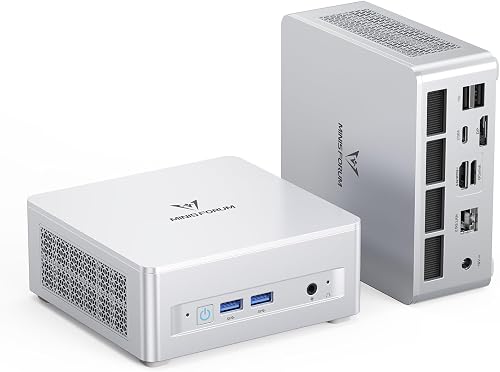
| Minisforum UM880 Plus mini PC | large project files | Ryzen 7 8845HS | 32GB DDR5, expandable to 96GB | 1TB PCIe 4.0 SSD, expandable to 4TB | 9.0 |
| GMKtec M6 Ultra mini PC (32GB) | family video libraries | Ryzen 5 7640HS | 32GB DDR5, expandable to 128GB | 1TB SSD, dual-slot expansion | 8.9 |
| GEEKOM A6 mini PC | 4K family clips | Ryzen 7 6800H | 16GB DDR5, upgradeable to 64GB | 1TB PCIe 4.0 SSD | 8.8 |
| GEEKOM IT13 Max mini PC | Intel-based editing | Core Ultra 9 185H | 24GB LPDDR5 | 500GB PCIe 4.0 SSD, expandable | 8.7 |
| Minisforum X1 Lite mini PC | memory headroom | Ryzen 7 255 | 32GB DDR5, expandable to 128GB | 1TB PCIe 4.0 SSD, two M.2 slots | 8.5 |
| GMKtec K12 mini PC | external GPU plans | Ryzen 7 H 255 | 32GB DDR5 | 512GB PCIe 4.0 SSD, three M.2 slots | 8.4 |
| Bosgame P6 Ryzen 9 mini PC | compact 1080p projects | Ryzen 9 6900HX | 24GB LPDDR5X | 1TB PCIe 4.0 SSD, additional M.2 expansion | 7.8 |
Best mini PCs for video editing and family videos
The right pick depends on your footage, editing software, storage needs and plans for future upgrades. These eight options range from upgradeable systems to models with 32GB of memory already installed.
GEEKOM A8 mini PC: Best for 4K editing
- Ryzen 7 8745HS processor
- Radeon 780M integrated graphics
- 16GB DDR5 memory, upgradeable to 128GB
- 1TB PCIe 4.0 SSD
The A8 pairs a Ryzen 7 8745HS with Radeon 780M graphics and upgradeable DDR5 memory. Its 1TB SSD gives a video library room to start, with expansion available as projects grow.
Pros
- Radeon 780M integrated graphics
- Memory upgrades up to 128GB
- 1TB SSD
Cons
- Starts with 16GB of memory
- No dedicated graphics card
The GEEKOM A8 is the best fit for demanding home editing among these picks. Its Ryzen 7 8745HS has 8 cores and 16 threads, with speeds up to 4.9GHz, and Radeon 780M graphics handle display and visual work.
The system starts with 16GB of DDR5 memory and a 1TB PCIe 4.0 SSD. GEEKOM says the memory can be upgraded to 128GB and storage to 4TB, so you can add capacity as your editing needs grow.
For a cleaner desk, the 0.5-liter chassis can sit behind a monitor using the included VESA bracket. The A8 also has USB4, Wi-Fi 6E and 2.5GbE LAN.
Choose it for 4K projects and a clear upgrade path. If you want 32GB of memory immediately, the UM880 Plus or M6 Ultra starts there instead.
Minisforum UM880 Plus mini PC: Best for large project files
- Ryzen 7 8845HS processor
- 32GB DDR5 memory
- 1TB PCIe 4.0 SSD
- Radeon 780M graphics
The UM880 Plus combines 32GB of DDR5 memory with a 1TB SSD and Radeon 780M graphics. A second M.2 slot and upgrade options give you room to expand storage.
Pros
- 32GB memory included
- Two M.2 SSD slots
- Three display outputs
Cons
- No dedicated graphics card
- Using OCuLink requires one M.2 SSD slot
The Minisforum UM880 Plus is a good match for large footage collections and multitasking. It includes 32GB of DDR5 memory, a 1TB PCIe 4.0 SSD and Radeon 780M graphics, with memory expansion up to 96GB.
Its two M.2 slots let you add storage, with support for drives up to 4TB in each slot. This can help keep working files and a larger video library on the same small computer, though separate backups still matter.
HDMI 2.1, DisplayPort 1.4 and USB4 can connect up to three displays at once. If you plan to use OCuLink for an external graphics card, note that this connection uses one M.2 SSD slot.
GMKtec M6 Ultra mini PC (32GB): Best for family video libraries
- Ryzen 5 7640HS processor
- 32GB DDR5 memory
- 1TB SSD
- Radeon 760M integrated graphics
The M6 Ultra offers 32GB of memory and a 1TB SSD, useful when family footage and editing apps share one small computer. Its Radeon 760M graphics support hardware encoding and decoding for common video codecs.
Pros
- 32GB memory included
- Expandable memory and storage
- Three simultaneous displays
Cons
- Ryzen 5 processor rather than Ryzen 7
- No dedicated graphics card
The GMKtec M6 Ultra suits family video collections and everyday editing. It combines 32GB of DDR5 memory with a 1TB SSD, and its storage can be expanded across two slots.
Its Ryzen 5 7640HS has 6 cores and 12 threads, while Radeon 760M graphics support hardware encoding and decoding for common video codecs. Those features can be useful for routine clip trimming, organizing footage and exporting in compatible formats.
The computer supports three simultaneous displays, including USB4, HDMI and DisplayPort connections. It also supports memory upgrades up to 128GB, though the upgrade is not included.
GEEKOM A6 mini PC: Best for 4K family clips

- Ryzen 7 6800H processor
- Radeon 680M graphics
- 16GB DDR5 memory, upgradeable to 64GB
- 1TB PCIe 4.0 SSD
The A6 has a Ryzen 7 6800H, Radeon 680M graphics and a 1TB SSD. Its memory can be upgraded to 64GB, giving a path to more room for editing applications and multitasking.
Pros
- 1TB SSD
- Upgradeable memory
- USB4 and dual HDMI
Cons
- Starts with 16GB of memory
- Radeon 680M is an older graphics generation than Radeon 780M
The GEEKOM A6 is a flexible option for home video work with a Ryzen 7 6800H, Radeon 680M graphics and a 1TB PCIe 4.0 SSD. It starts with 16GB of DDR5 memory, which can be upgraded to 64GB.
Its USB4 port and dual HDMI connections support a multi-screen desk, and the system can drive up to four 4K monitors. That may be useful if you edit on one screen while keeping folders, notes or a preview on others.
The Radeon 680M is an older graphics generation than the Radeon 780M in the A8 and UM880 Plus. Pick the A6 if its upgradeable memory and display connections fit your setup, and compare it with our mini PC photo editing picks if you also work with still images.
GEEKOM IT13 Max mini PC: Best for Intel-based editing

- Core Ultra 9 185H processor
- Intel Arc 140T integrated graphics
- 24GB LPDDR5 memory
- 500GB PCIe 4.0 SSD
The IT13 Max pairs a Core Ultra 9 185H with Intel Arc 140T graphics and 24GB of memory. Choose it if you want an Intel-based editing setup and plan to use its storage expansion options.
Pros
- Intel Arc 140T graphics
- 24GB memory included
- Additional storage expansion options
Cons
- 500GB SSD is the smallest included drive here
- Memory is LPDDR5
The GEEKOM IT13 Max is the Intel choice for a compact editing desk. It pairs a Core Ultra 9 185H with Intel Arc 140T graphics and 24GB of LPDDR5 memory.
Its 500GB PCIe 4.0 SSD is smaller than the 1TB drives in most picks here. The system supports additional storage expansion, and an SD card reader can add up to 2TB of extra storage.
Choose it if Intel hardware and its connectivity suit your setup. The memory is LPDDR5, so focus on the included 24GB when deciding whether it will fit the editing software and projects you plan to run.
Minisforum X1 Lite mini PC: Best for memory headroom

- Ryzen 7 255 processor
- Radeon 780M graphics
- 32GB DDR5 memory, expandable to 128GB
- 1TB PCIe 4.0 SSD
The X1 Lite starts with 32GB of DDR5 memory and a 1TB SSD. Its dual M.2 slots and Radeon 780M graphics make it a flexible option for editing and storing video files.
Pros
- 32GB memory included
- Two M.2 SSD slots
- Radeon 780M graphics
Cons
- No dedicated graphics card
- OCuLink use requires one M.2 SSD slot
The Minisforum X1 Lite gives you 32GB of memory with room to expand. It has a Ryzen 7 255 processor, Radeon 780M graphics and a 1TB PCIe 4.0 SSD.
Two M.2 slots support up to 4TB per drive, and its memory can be upgraded to 128GB. HDMI 2.1, DisplayPort 1.4 and USB4 provide three display outputs for an editing desk with several screens.
Like the UM880 Plus, its OCuLink connection uses one M.2 slot. Choose it if memory and storage expansion are priorities, and you are comfortable with that tradeoff when considering an external GPU later.
GMKtec K12 mini PC: Best for external GPU plans

- Ryzen 7 H 255 processor
- Radeon 780M graphics
- 32GB DDR5 memory
- OCuLink port
The K12 includes 32GB of DDR5 memory, Radeon 780M graphics and an OCuLink port for a possible external GPU setup. Its 512GB SSD is less room for footage than the 1TB drives in several other picks.
Pros
- 32GB memory included
- OCuLink port for external GPU connection
- Three M.2 slots
Cons
- 512GB included SSD
- No dedicated graphics card included
The GMKtec K12 is the pick for a possible external GPU setup. It comes with a Ryzen 7 H 255, Radeon 780M graphics and 32GB of DDR5 memory, plus an OCuLink port.
Its included 512GB SSD is smaller than the 1TB drives in several alternatives. Three M.2 slots support storage expansion, so there is room to add drives for project files and saved footage.
The K12 supports up to four displays and has HDMI 2.1, DisplayPort and USB-C video output. Consider it when you want OCuLink flexibility and plan to expand storage after setup.
Bosgame P6 Ryzen 9 mini PC: Best for compact 1080p projects

- Ryzen 9 6900HX processor
- Radeon 680M integrated graphics
- 24GB LPDDR5X memory
- 1TB PCIe 4.0 SSD
The P6 pairs a Ryzen 9 6900HX with 24GB of memory, Radeon 680M graphics and a 1TB SSD. It is a compact option for lighter editing projects, with a second M.2 slot for added storage.
Pros
- 24GB memory included
- 1TB SSD
- Three 4K display outputs
Cons
- Memory is onboard
- Radeon 680M graphics
The Bosgame P6 suits compact 1080p editing and lighter creative work. Its Ryzen 9 6900HX, Radeon 680M graphics, 24GB of memory and 1TB PCIe 4.0 SSD make a capable starting configuration for home projects.
The memory is onboard, so choose it based on the 24GB included rather than expecting a memory upgrade. A second M.2 slot supports additional storage, and HDMI, DisplayPort and USB-C can drive three 4K displays.
Pick the P6 if you want a Ryzen 9 processor in a compact system and your projects fit its fixed memory. For a memory upgrade path, the A6 or A8 gives you more flexibility.
What matters most in a video editing mini PC?
For a video editing mini PC, prioritize a processor and graphics setup that meet your software's needs, then choose enough memory and storage for your projects. The best balance depends on the footage resolution and effects you use.
Is a faster processor or more memory better for editing?
Both matter, but the best choice depends on your workflow. A capable processor helps with editing tasks and exports, while memory gives the editor and other open apps room to work.
If you regularly edit larger projects or multitask, 32GB is a useful starting point to consider. For occasional trimming of family clips, 16GB may be enough when the software's requirements allow it, and upgradeable models give you an option to add memory later.
Do you need a dedicated graphics card?
Not every home video editor needs a dedicated graphics card. The mini PCs here use integrated graphics, including Radeon 780M, Radeon 760M, Radeon 680M and Intel Arc 140T.
Integrated graphics can suit straightforward edits, but demanding effects and timelines can call for more graphics power. Check the software maker's recommended hardware and footage requirements, and look at an OCuLink model only if you intend to build an external GPU setup.
How much SSD space should you choose?
A 1TB SSD is a better starting point for video projects than a 500GB or 512GB drive, but it can still fill up with source footage and exports. Keep a separate backup drive or another backup copy for family videos you want to preserve.
Models with additional M.2 slots can add internal storage. Compare the drive expansion details with your preferred backup plan before choosing a mini PC.
Will a mini PC run two editing monitors?
Yes, several picks support multiple displays, but check the available video outputs and your monitor's resolution and refresh needs. The UM880 Plus supports three displays through HDMI, DisplayPort and USB4, while the A6 can drive up to four 4K monitors.
Our guide to mini PC dual monitor support explains how ports and cables affect a two-screen setup. For a specific port layout, see mini PCs with 2 HDMI ports.
Which mini PC should you choose for family videos?
Choose the GEEKOM A8 if you want the strongest overall balance here and an upgrade path for memory and storage. Choose the UM880 Plus or M6 Ultra if you prefer 32GB of memory from the start, and the K12 if you expect to use an external GPU.
For occasional trimming and organizing, a model with 16GB or 24GB may suit your needs if it meets your editor's requirements. For a broader home-use comparison, see our guide to the best mini computers for everyday home use.
Our score weighs specs, features and buyer feedback against what you're shopping for.
Our top 3 picks at a glance
-
1
-
2
-
3
Frequently asked questions
Can a mini PC edit 4K video?
Yes, some mini PCs have processors and integrated graphics suited to 4K editing, but the result depends on your editing software, footage and effects. The GEEKOM A8 combines a Ryzen 7 8745HS with Radeon 780M graphics, while the Minisforum UM880 Plus adds 32GB of memory from the start.
Check your software's recommended system requirements before choosing a computer.
How much memory should a mini PC have for video editing?
For a video editing mini PC, 16GB is a starting point, while 32GB gives more room for the editor, source files and other apps to run together. The projects you edit and the software you use affect how much memory you'll need.
Several picks here start with 32GB, and some allow upgrades.
Is integrated graphics enough for family video editing?
Integrated graphics can suit basic edits, short family clips and common video formats, especially when paired with a capable processor and enough memory. The GMKtec M6 Ultra, for example, has Radeon 760M graphics and supports hardware encoding and decoding for common codecs.
For complex effects or demanding timelines, check the software maker's requirements.
How much storage do I need for family videos?
A 1TB SSD gives you more working room than a 500GB drive, but video files can still fill it quickly. Keep a separate backup of footage you want to preserve, and check whether the mini PC supports a second drive or larger replacement drive.
The UM880 Plus and X1 Lite each have two M.2 slots.
Should I choose a mini PC with an external GPU port?
Choose an OCuLink model if you expect to build an external GPU setup and are comfortable with the added hardware. The Minisforum UM880 Plus and X1 Lite support OCuLink, but using it requires an M.2 SSD slot.
For ordinary family clips, an external GPU may be more setup than you need.


