9 Best Mini PCs With 2 HDMI Ports for Two Screens (November 2026)
The best mini PCs with dual HDMI ports include the GEEKOM A6 mini PC for demanding two-screen work, the GEEKOM A5 mini PC for flexible display expansion, and the GMKtec Core i7-1185G7 mini PC for three-screen output.
On this page (6 sections)
The best mini PC with 2 HDMI ports for most two-screen desks is the GEEKOM A6, which combines dual HDMI with USB4 and supports up to four 4K monitors. For everyday office work with two 4K screens, the Beelink Mini S13 has a simpler feature set.
Two HDMI ports make it easy to connect a pair of monitors directly, but the right pick also depends on what you do on those screens. A browser-and-email desk has different needs from a work setup with large spreadsheets or extra displays.
If you're still choosing a computer type, our guide to best mini desktop computers compares broader home options. For routine home tasks, see mini PCs for everyday home use.
Our picks at a glance
-
1

-
2

-
3

Which mini PCs with 2 HDMI ports stand out?
The GEEKOM A6 stands out for higher display capacity, while the Beelink Mini S13 fits a simple two-screen office setup. These picks all have two HDMI ports, with several offering additional display connections.
GEEKOM A6 mini PC: Best for demanding two-screen work
- Dual HDMI
- USB4
- Up to four 4K monitors
- Ryzen 7 6800H
Dual HDMI ports cover a two-monitor setup, while USB4 adds another display connection option. Its Ryzen 7 6800H and 16GB DDR5 also suit heavier office and creative workloads.
Pros
- Dual HDMI and USB4
- Supports up to four 4K monitors
- 16GB DDR5 and 1TB PCIe 4.0 SSD
Cons
- More display capacity than a basic two-screen setup may need
The GEEKOM A6 is the most flexible pick here for a desk that may grow beyond two screens. Dual HDMI plus USB4 supports up to four 4K monitors, so you can start with two HDMI displays and keep room for more.
Its Ryzen 7 6800H, 16GB DDR5 and 1TB PCIe 4.0 SSD give it more headroom for demanding work than the entry-level office models in this group. The RAM can be expanded up to 64GB, which adds an upgrade path if your workload grows.
For a two-screen setup, use the HDMI ports first and keep USB4 available for a compatible display or dock. Check your monitor inputs and cable needs before you arrange the desk.
Choose it if you want two screens now and room to add more, along with stronger processor and storage specs. If your work stays limited to browsing and documents, a more basic pick may fit the job.
GEEKOM A5 mini PC: Best for flexible display expansion
- Dual HDMI
- Dual USB-C
- Up to four displays
- 16GB RAM
The A5 has dual HDMI ports for two screens and dual USB-C ports for additional display options. Its 16GB RAM and 256GB SSD fit everyday office use, with memory and storage expansion available.
Pros
- Four display connection options
- RAM and storage can be expanded
- Compact 0.6L design
Cons
- The included SSD is 256GB
The GEEKOM A5 gives you dual HDMI for two displays and two USB-C ports for additional display options. It supports up to four displays, making it useful if you expect to add screens later.
Its Ryzen 7 7730U, 16GB RAM and 256GB NVMe SSD suit everyday work such as Office apps, browser tabs and remote learning. The RAM can be upgraded up to 64GB, and the M.2 storage can be expanded.
The A5 is compact at 0.6L and includes a VESA mount, which can help clear desk space when paired with a compatible monitor. Its USB-C ports are an extra option, so check the display connection method you plan to use.
Pick the A5 for a flexible office setup with two HDMI displays and expansion potential. Its 256GB SSD is smaller than the 1TB drives on some other picks.
GMKtec Core i7-1185G7 mini PC: Best for three-screen output
- Two HDMI ports
- USB-C video output
- Three 4K screens at once
- 16GB DDR4
Two HDMI outputs handle a pair of monitors, and USB-C provides a third display connection. The 16GB DDR4 and 1TB SSD give you room for multitasking and files.
Pros
- Three independent 4K displays supported
- 16GB DDR4 and 1TB SSD
- Memory and storage can be expanded
Cons
- Older 11th-generation Intel processor
This GMKtec mini PC has two HDMI outputs and one USB-C video output, supporting three 4K displays at once. That makes it a fit for a two-monitor desk that may later add a third screen.
It comes with 16GB DDR4 and a 1TB NVMe SSD. The memory supports expansion up to 64GB, and the storage can be expanded through its M.2 slots.
The Intel Core i7-1185G7 is an 11th-generation processor. Its listed display support and upgrade options may matter more than having a newer processor if your main goal is multiple screens and local storage flexibility.
Choose it for the third display option and 1TB SSD. For a basic dual-screen setup, the Beelink Mini S13 has the more direct two-HDMI configuration.
Beelink Mini S13 mini PC (16GB): Best for everyday office tasks
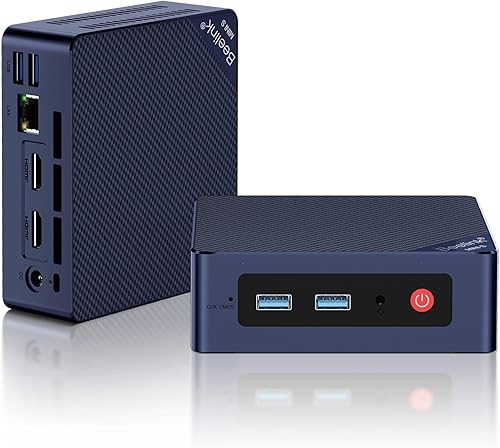
- Two HDMI ports
- Dual 4K display support
- 16GB DDR4
- 500GB M.2 SSD
The Mini S13 is a direct fit for a two-monitor desk, with two HDMI ports and support for two 4K screens. Its Intel N150 processor is aimed at routine tasks, office work and home entertainment.
Pros
- Two HDMI ports
- Supports two 4K screens at once
- 16GB DDR4 and 500GB SSD
Cons
- No third display output is specified
The Beelink Mini S13 is a straightforward choice for two screens: it has two HDMI ports and supports two 4K monitors at once. Its Intel N150 processor is described for routine tasks, office work and home entertainment.
The 16GB DDR4 and 500GB M.2 SSD provide a useful starting point for documents, apps and common files. The computer also supports Wake-on-LAN, PXE Boot, RTC Wake and Auto Power On.
The Mini S13 includes a wall-mount bracket, which can put the small computer behind a monitor and free up desk space. The dual-screen support is the key fit here; no third display output is specified.
Pick this Beelink for typical office tasks across two screens. If you need a third screen or heavier workloads, consider one of the GEEKOM or GMKtec options above.
GEEKOM IT12 mini PC: Best for business display setups

- Dual HDMI 2.0
- Dual USB4
- Up to four displays
- 16GB DDR4
Two HDMI ports provide the direct connection for a pair of screens, while dual USB4 ports expand the setup. The IT12 has 16GB DDR4 and a 256GB NVMe SSD, with memory and storage expansion options.
Pros
- Four display connections
- Memory can be expanded
- 2.5Gb Ethernet
Cons
- The included SSD is 256GB
The GEEKOM IT12 offers dual HDMI 2.0 and dual USB4, with support for up to four displays. That gives a two-screen setup a direct HDMI connection while leaving other ports available for compatible monitors or devices.
It has an Intel Core i3-12300HE, 16GB DDR4 and a 256GB NVMe SSD. The memory can be expanded up to 96GB, and additional storage options are available.
This model is aimed at business use, including digital signage, POS systems and other long-running commercial tasks. For a home desk, its extra display ports may be useful if you need more than two screens or want USB4 connections.
Choose the IT12 for a business desk with several display options. If two HDMI ports are all you need, you may not use its full display capacity.
Kamrui AK1 Plus mini PC: Best for a basic two-screen desk

- Dual HDMI 2.0
- Two 4K screens at 60Hz
- 16GB LPDDR4X
- Expandable storage
The AK1 Plus keeps the connection plan simple: use its two HDMI 2.0 ports for two 4K monitors. It is suited to browsing, email, online classes and video calls.
Pros
- Two HDMI 2.0 ports
- Dual 4K at 60Hz support
- Storage expansion options
Cons
- Intel Celeron N5095 is aimed at everyday computing
The Kamrui AK1 Plus provides two HDMI 2.0 ports and supports two 4K displays at 60Hz. It suits a simple dual-monitor arrangement for browsing, email, online classes and video calls.
Its 16GB LPDDR4X memory and 256GB M.2 SSD cover common everyday tasks. Storage can be expanded through an additional M.2 SSD and a 2.5-inch SATA drive.
The Intel Celeron N5095 is intended for everyday computing rather than demanding workloads. It has four USB 3.2 ports, Gigabit Ethernet and a 3.5mm audio jack alongside the HDMI outputs.
Choose it for everyday two-screen work and storage expansion options. For heavier applications or adding a third display, another pick here has more headroom.
GMKtec G11 mini PC: Best for a three-display office

- Dual HDMI 2.0
- USB-C DisplayPort
- Up to three 4K displays
- Dual 2.5GbE
Two HDMI ports can drive a dual-monitor desk, with USB-C DisplayPort available if you later add a third screen. The dual 2.5GbE ports also suit a desk that needs flexible wired networking.
Pros
- Three independent 4K displays supported
- Dual 2.5GbE ports
- Dual M.2 SSD slots
Cons
- The processor is designed for continuous operation and commercial settings
The GMKtec G11 pairs two HDMI 2.0 ports with USB-C DisplayPort, supporting up to three 4K displays. The USB-C output gives you an extra screen option if your desk grows beyond two monitors.
Its Ryzen Embedded R2514 processor is designed for continuous operation in commercial and professional settings. The system has 16GB dual-channel DDR4, dual 2.5GbE Ethernet ports and two M.2 SSD slots.
Those network and display features may suit a workstation that also serves a networking or control role. For a basic home desk, the extra ports may be more than you need.
Pick the G11 for a three-display office or a desk with dual wired network needs. Check the display inputs and USB-C video compatibility before planning a third screen.
GMKtec G3 Ultra mini PC: Best for two 4K screens on a budget

- Two HDMI 2.0 ports
- Two 4K screens at 60Hz
- 16GB LPDDR4
- 512GB SSD
The G3 Ultra has two HDMI 2.0 ports for a straightforward dual-screen setup. Its 16GB LPDDR4 and 512GB SSD make it a practical option for office apps, browsing and streaming.
Pros
- Two HDMI 2.0 ports
- Dual 4K at 60Hz support
- 512GB SSD
Cons
- Pentium Gold 7505 is positioned for everyday work and media
The GMKtec G3 Ultra uses two HDMI 2.0 ports for dual 4K displays at 60Hz. Its 16GB LPDDR4 memory and 512GB SSD suit browsing, office apps and media playback.
The Intel Pentium Gold 7505 and integrated Intel graphics are positioned for everyday computing. The computer also has Wi-Fi 6, Bluetooth 5.2 and Gigabit Ethernet.
This is a direct choice when you want two HDMI screens without needing extra display outputs. The G3 Ultra's specified display support covers a pair of 4K screens.
Choose it for a simple dual-4K setup focused on routine tasks. For more demanding work or extra displays, step up to one of the higher-ranked options.
Beelink Mini S12 mini PC: Best for light dual-screen use
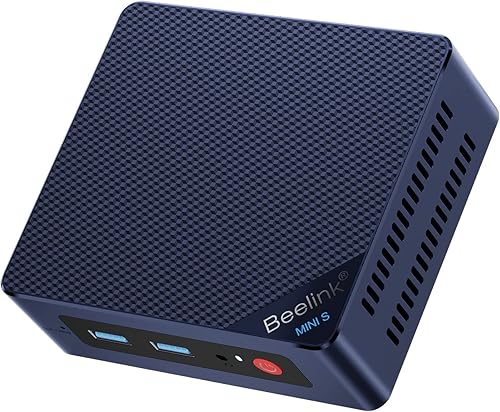
- Two HDMI ports
- Dual 4K display support
- Intel N95
- 8GB DDR4 and 256GB SSD
The Mini S12 connects two 4K displays through its HDMI ports and is suited to browsing, word processing and streaming. Its 8GB RAM and 256GB SSD are more modest than the other picks.
Pros
- Two HDMI ports
- Dual 4K display support
- Compact dimensions
Cons
- 8GB RAM and 256GB SSD
The Beelink Mini S12 connects two 4K displays through its HDMI ports. It is designed for light tasks such as browsing, word processing, video calls and streaming.
Its Intel N95 processor, 8GB DDR4 and 256GB SSD make it the most modest configuration in this roundup. A VESA mount is included for placing the mini PC behind a compatible monitor.
The two HDMI outputs are a clear fit for a basic dual-screen desk, but memory and storage are limited compared with the other picks. Consider what apps you run at the same time before choosing this configuration.
Pick the Mini S12 for light work across two screens. If you regularly keep many apps open, the Beelink Mini S13's 16GB RAM is a more suitable starting point.
How should you choose a mini PC for two monitors?
Choose a mini PC that supports two displays at your intended resolution, then check the ports on both the computer and your monitors. Two HDMI ports make direct connections simple, while USB-C video can add flexibility if the PC supports it.
For most desk setups, use these checks:
- Confirm both HDMI ports can be used at once. Product specs should state dual-display support, not just the presence of two ports.
- Match the resolution and refresh rate. A computer may support two screens while having different limits for each output combination.
- Check monitor inputs. If one screen only has DisplayPort or USB-C, you may need a compatible cable or adapter.
- Count your other devices. Leave enough USB ports for a keyboard, mouse, webcam and storage.
- Think about upgrades. A model with USB-C display support can provide another option if you add a third screen later.
Our mini PC dual monitor support guide explains cable choices and setup steps. If the computer will support a business desk, compare the needs in our small business mini PC guide.
Does a mini PC need two HDMI ports for dual monitors?
No. Two HDMI ports are convenient, but some mini PCs use one HDMI output and another video-capable port such as USB-C.
Check that the computer supports two displays at once and that you have the right cable or adapter for each monitor.
The GEEKOM A6, A5 and IT12, for example, have additional USB-C display options alongside dual HDMI. That can help if you add a third screen or use a monitor with USB-C input.
What cables do you need for two HDMI monitors?
You need two HDMI cables, one for each monitor, when connecting both screens directly to the PC's HDMI ports. The cables should support the resolution and refresh rate you want to use.
For a mixed-port setup, the cable or adapter must match the PC's video output and the monitor's input. Check the PC's supported display combinations before buying accessories.
Will two screens make everyday work easier?
Two screens can keep separate tasks visible at once, such as a document on one display and reference material on the other. Whether that helps depends on your work and available desk space.
Measure the desk and consider monitor size, stands and viewing distance before adding a second screen. A two-display setup also uses more cables and power outlets than a single monitor.
Which mini PC with 2 HDMI ports should you choose?
Choose the GEEKOM A6 if you want a strong processor and the option to connect up to four displays. The Beelink Mini S13 fits routine work on two 4K screens, while the GMKtec G3 Ultra is a direct dual-HDMI choice for office apps and streaming.
For a third screen, consider the GMKtec Core i7-1185G7 or G11. If you're still weighing the overall computer type, start with our best mini desktop computer guide.
Our top 3 picks at a glance
-
1
-
2
-
3
Frequently asked questions
Can a mini PC with 2 HDMI ports run two monitors?
Yes. A mini PC with two HDMI outputs can connect to two HDMI monitors, and several picks here specify support for two 4K displays.
Check the PC's stated display limit and each monitor's resolution, then use cables that match the ports on both devices.
Connect each screen directly to its own HDMI port.
Do both monitors need the same resolution?
No. The monitors can have different resolutions, but the PC's maximum display support still applies.
Check the resolution and refresh rate supported by the computer and each screen, then set each display in your operating system.
For a two-screen setup, match each monitor to a supported output.
Can I use HDMI and USB-C for three monitors?
Some mini PCs support three or four displays through a mix of HDMI and USB-C video outputs. The GMKtec Core i7-1185G7 and GMKtec G11 specify three displays, while the GEEKOM A6 and IT12 support up to four.
Confirm the exact port combination and display limits for the model you choose.
What should I check before buying a mini PC for two screens?
Check that the PC has two usable HDMI outputs and supports the resolution you want on both screens at once. Also count the USB ports you need for a keyboard, mouse and other devices, and confirm that both monitors have HDMI inputs.
Our mini PC dual monitor setup guide covers cables and connection steps.


