8 Best Mini PCs for Small Business and Office Work (November 2026)
The best mini PCs for small business and office work include the ACEMAGIC K1 Ryzen 7 7730U mini PC for flexible office setups, the Bosgame E7 mini PC for wired office networks, and the Beelink SER5 MAX mini PC for memory-heavy multitasking.
On this page (7 sections)
- How we chose these business mini PCs
- The best mini PCs for small business and office work
- How should you match a business mini PC to the workload?
- How many displays should an office mini PC support?
- Is expandable memory or storage more useful?
- What network ports should a small office check?
- Which business mini PC should you choose?
The best mini PC for business depends on the work and desk setup. The ACEMAGIC K1 is our top all-around pick for its Ryzen 7 processor and 3 display outputs, while the BOSGAME E7 stands out for dual Ethernet and expandable memory.
These compact computers suit document work, spreadsheets, web apps and video meetings. Before choosing, count your monitors, check the ports and decide how much memory and local storage your staff needs.
Use our mini PC picks by use guide to compare computers for different workloads. If your office relies on several screens, our guide to mini PCs with 2 HDMI ports covers another useful port choice.
Our picks at a glance
-
1

-
2

-
3

How we chose these business mini PCs
We compared processor, memory, storage, display connections and networking against common small office needs. Our score weighs specs and features against what you're shopping for.
A small business may need a different mix from a home desk. One staff member may need two wired network connections, while another may benefit more from additional memory or room for several monitors.
The picks are ordered by their scores, but the right fit depends on the actual software and peripherals in your office. Confirm monitor inputs, network needs and upgrade plans before settling on a model.
| Product | Best for | Processor | Memory and storage | Displays | Our score |
|---|---|---|---|---|---|
| ACEMAGIC K1 Ryzen 7 7730U mini PC | flexible office setups | AMD Ryzen 7 7730U | 16GB RAM, 512GB SSD | Up to 3 | 8.6 |
| Bosgame E7 mini PC | wired office networks | Intel Core 3 100U | 16GB RAM, 512GB SSD | 8.5 | |
| Beelink SER5 MAX mini PC | memory-heavy multitasking | AMD Ryzen 7 7735U | 24GB RAM, 500GB SSD | Up to 3 | 8.5 |
| GMKtec Core i7-1185G7 mini PC | two HDMI monitors | Intel Core i7-1185G7 | 16GB RAM, 1TB SSD | Up to 3 | 8.4 |
| GEEKOM IT12 mini PC | four-screen workstations | Intel Core i3-12300HE | 16GB RAM, 256GB SSD | Up to 4 | 8.2 |
| Kamrui Pinova P2 mini PC (32GB) | large app workloads | Intel Core i5-12600H | 32GB RAM, 1TB SSD | Up to 3 | 7.9 |
| GMKtec M2 Pro S mini PC | expandable office storage | Intel Core i7-1185G7 | 16GB RAM, 512GB SSD | 7.8 | |
| Kamrui Pinova P1 mini PC | basic office tasks | AMD Ryzen 3 Pro 7330U | 8GB RAM, 256GB SSD | Up to 3 | 7.7 |
The best mini PCs for small business and office work
The ACEMAGIC K1 is the strongest fit for a flexible everyday office setup in this group. Each alternative below emphasizes a different need, from extra storage to wired network ports or additional memory.
ACEMAGIC K1 Ryzen 7 7730U mini PC: Best for flexible office setups
- Ryzen 7 7730U
- 16GB memory and 512GB SSD
- HDMI, DisplayPort and USB-C display outputs
- Wi-Fi 6 and Gigabit Ethernet
A strong fit for a small office that wants a capable processor and multiple display connections. Its mix of HDMI, DisplayPort and USB-C gives you options for a multi-screen desk.
Pros
- Three display outputs
- Five USB 3.2 ports
- Wi-Fi 6 and Gigabit Ethernet
Cons
- Memory is onboard and cannot be upgraded
- Additional storage requires a separate SSD
The ACEMAGIC K1 pairs a Ryzen 7 7730U with 16GB of memory and a 512GB SSD. That combination makes it a sensible choice for an office running several browser tabs, documents and communication apps during the day.
Its HDMI, DisplayPort and USB-C connections support up to 3 displays, so check that your monitors have matching inputs. Five USB 3.2 ports also leave room for common desk accessories.
The memory is onboard and cannot be upgraded, while the SSD can be replaced or expanded. If you expect local storage needs to grow, plan for that separately before setting up several staff machines.
Choose this for a flexible desk with multiple displays and a mix of everyday work apps. For a more focused look at photo and design workloads, see our mini PCs for photo editing guide.
Bosgame E7 mini PC: Best for wired office networks
- Intel Core 3 100U
- 16GB DDR4 memory and 512GB SSD
- Dual Gigabit Ethernet ports
- Up to 3 displays
Dual Ethernet ports suit desks that need two wired network connections. Memory can be expanded to 64GB, and the extra M.2 slot offers room for more storage.
Pros
- Two Gigabit Ethernet ports
- Memory expandable to 64GB
- Up to 3 displays
Cons
- Only one additional M.2 SSD slot is described
- Check the monitor inputs against its HDMI, DisplayPort and USB-C outputs
The BOSGAME E7 fits a small office that uses wired network connections and expects memory needs to change. It has two Gigabit Ethernet ports, 16GB of DDR4 memory and a 512GB NVMe SSD.
Its two SODIMM slots support up to 64GB of memory, and a second M.2 slot gives you a path to add storage. Those options are useful when you want a compact starting system with room to adjust later.
The E7 can connect to as many as 3 displays through HDMI, DisplayPort and full-function USB-C. It comes with Windows 11 Pro and is also compatible with Ubuntu Linux.
Pick it when the dual Ethernet ports or memory expansion match your work setup. Count your monitors and peripherals first so you know which ports will be in use.
Beelink SER5 MAX mini PC: Best for memory-heavy multitasking
- AMD Ryzen 7 7735U
- 24GB LPDDR5 memory and 500GB SSD
- HDMI, DisplayPort and USB-C video outputs
- Wi-Fi 6 and 2.5G LAN
The 24GB of memory gives a busy office more room for several apps at once. Its 3 video outputs can support a multi-screen work area.
Pros
- 24GB LPDDR5 memory
- Three display outputs
- 2.5G LAN
Cons
- Memory is built in
- Auto power-on setup requires contacting Beelink
The Beelink SER5 MAX provides 24GB of LPDDR5 memory for desks where staff tend to keep several apps open. Its Ryzen 7 7735U processor and 500GB SSD round out a setup aimed at multitasking.
The HDMI, DisplayPort and USB-C outputs support up to 3 displays. Wi-Fi 6 and 2.5G LAN give you wireless and wired network choices, depending on how the office is connected.
The memory is built in, so choose its capacity with future needs in mind. Beelink says auto power-on setup requires contacting its support team for the matching instructions.
This is a good fit when you want more memory than the 16GB options here. If your office also handles video work, our mini PCs for video editing guide covers that more demanding use.
GMKtec Core i7-1185G7 mini PC: Best for two HDMI monitors

- Intel Core i7-1185G7
- 16GB DDR4 memory and 1TB SSD
- 2 HDMI outputs plus USB-C video
- Memory expandable to 64GB
Two HDMI ports make it straightforward to connect common office monitors. The 1TB SSD gives this model more built-in storage than most picks here.
Pros
- Two HDMI outputs
- 1TB SSD
- Memory expandable to 64GB
Cons
- Older 11th-generation processor
- Confirm which model name and warranty terms apply before buying
The GMKtec Core i7-1185G7 option stands out for two HDMI outputs and a 1TB SSD. The additional storage can suit a workstation that keeps more project files on the computer.
It also has DisplayPort and USB-C video output for up to 3 displays. The 16GB of DDR4 memory can be expanded to 64GB, and the system includes a second slot for an M.2 SATA drive.
The product name uses the GMKtec M2 Pro S model, so confirm the exact configuration and warranty terms before you buy. The supplied product information describes 1TB storage for this ASIN.
Choose it when two HDMI monitors and a larger SSD matter more than having the newest processor generation. For another view of the brand's models, see our GEEKOM A6 vs A8 comparison.
GEEKOM IT12 mini PC: Best for four-screen workstations

- Intel Core i3-12300HE
- 16GB DDR4 memory and 256GB SSD
- Up to 4 displays
- 2.5Gb Ethernet and Wi-Fi 6E
The four display outputs can help desks built around dashboards, documents and calls. Its 256GB SSD is smaller than several alternatives, though storage expansion is supported.
Pros
- Up to 4 displays
- Memory expandable to 96GB
- 2.5Gb Ethernet
Cons
- 256GB SSD leaves less room for local files
- Confirm port requirements for your monitor setup
The GEEKOM IT12 is the option for a workstation that needs up to 4 displays. Its Intel Core i3-12300HE, 16GB of memory and 256GB SSD suit a multi-screen desk where the files mainly live on a network or cloud service.
It provides dual USB4 and dual HDMI outputs, plus 2.5Gb Ethernet and Wi-Fi 6E. Memory can be expanded to 96GB, and GEEKOM describes additional storage options including SATA/HDD and SD card support.
The smaller 256GB SSD is the main tradeoff against several other picks. Consider how much software and local work data the team needs to keep on each computer.
Pick it when screen count is the priority and your storage plan fits. For other multi-screen options, see our guide to mini PC dual monitor support.
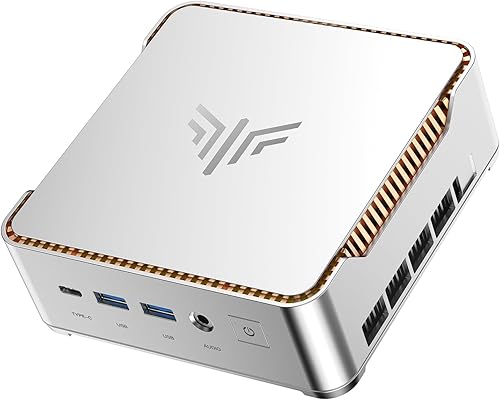
Kamrui Pinova P2 mini PC (32GB): Best for large app workloads
- Intel Core i5-12600H
- 32GB LPDDR5 memory and 1TB SSD
- Up to 3 displays
- Wi-Fi 6 and Gigabit Ethernet
A 32GB memory setup and 1TB SSD suit office work that keeps many apps and files open locally. Its HDMI, DisplayPort and USB-C outputs can drive 3 displays.
Pros
- 32GB LPDDR5 memory
- 1TB SSD
- Six USB 3.2 ports
Cons
- Memory is onboard
- Storage expansion drives are sold separately
The Kamrui Pinova P2 combines 32GB of LPDDR5 memory with a 1TB SSD. That capacity can suit office work involving many open apps, larger files or several active projects.
Its Intel Core i5-12600H and HDMI, DisplayPort and USB-C outputs support up to 3 displays. Six USB 3.2 ports help connect desk peripherals, and a VESA mount can attach the PC behind a monitor or under a desk.
The memory is onboard, so it cannot be treated as a later upgrade. The two storage slots support adding drives, but those drives are separate purchases.
Choose it if the initial 32GB memory and 1TB storage fit your team better than an upgrade path. Confirm that the monitor connections and mounting location work for your desks.
GMKtec M2 Pro S mini PC: Best for expandable office storage

- Intel Core i7-1185G7
- 16GB DDR4 memory and 512GB SSD
- Memory expandable to 64GB
- Two HDMI outputs and USB-C video
This option offers memory expansion and two SSD slots for a desk that may need more capacity later. Three display outputs also suit a multi-monitor workflow.
Pros
- Memory expandable to 64GB
- Two SSD slots
- 2.5G Ethernet
Cons
- Older 11th-generation processor
- Expansion drives are sold separately
The GMKtec M2 Pro S offers expandable memory and two storage slots in a compact office computer. It starts with 16GB of DDR4 memory and a 512GB NVMe SSD.
The memory can expand to 64GB, and a second M.2 2242 SATA slot can add storage alongside the M.2 2280 drive. HDMI, DisplayPort and USB-C video outputs support up to 3 screens, with Wi-Fi 6 and 2.5G Ethernet for networking.
This model shares a name with another GMKtec entry in this roundup, but the supplied configurations differ. Check the memory and SSD capacity carefully when comparing the two.
Choose this version if you want a clear storage expansion route. If your setup needs HDMI ports specifically, compare it with the two-HDMI mini PC guide.
Kamrui Pinova P1 mini PC: Best for basic office tasks

- AMD Ryzen 3 Pro 7330U
- 8GB RAM and 256GB SSD
- HDMI, DisplayPort and USB-C outputs
- Windows 11 Pro
The P1 covers everyday office basics such as spreadsheets, email and web pages. Its 8GB of memory and 256GB SSD leave less headroom for heavy multitasking or large local files.
Pros
- Windows 11 Pro
- Three display outputs
- Compact VESA mount option
Cons
- 8GB memory is less than other picks
- Wi-Fi 5 rather than Wi-Fi 6
The Kamrui Pinova P1 covers basic office tasks with a Ryzen 3 Pro 7330U, 8GB of memory and a 256GB SSD. It can suit a desk focused on email, spreadsheets, documents and browser-based tools.
Its HDMI, DisplayPort and USB-C outputs support up to 3 displays, and a VESA bracket can mount it behind a monitor. Windows 11 Pro comes preinstalled.
The 8GB memory and 256GB drive leave less room for heavy multitasking and local files than the higher-ranked picks. Choose it for a lighter workload, and make sure the RAM and storage fit the apps your staff uses.
How should you match a business mini PC to the workload?
Match the processor and memory to the software people use every day. Documents, email and browser apps ask less of a computer than large datasets, creative tools or many programs running together.
For general office work, begin with 16GB of memory and an SSD, then compare the processor and the number of monitors. The Pinova P1 has 8GB of memory for lighter tasks, while the Beelink and Kamrui P2 offer 24GB and 32GB respectively.
If a team uses specialized business software, check its stated hardware needs before ordering. A processor name alone cannot tell you whether a computer will suit every app or workflow.
How many displays should an office mini PC support?
Choose the number of display outputs to match the screens you actually use. All 8 picks in this guide support at least 3 displays according to their product information, while the GEEKOM IT12 supports up to 4.
The connection type matters as much as the number. Check whether the monitors accept HDMI, DisplayPort or USB-C, and confirm the computer's supported combinations in its manual before you buy.
A two-screen desk can also use a model with more outputs than needed, leaving options for a later change. See our guide to mini PC dual monitor support for connection and cable details.
Is expandable memory or storage more useful?
Expandable memory helps when apps need more working space, while extra storage helps keep more files and software on the computer. Decide which is more likely to matter for your staff before choosing a system.
The BOSGAME E7 and GMKtec models here support memory upgrades. The ACEMAGIC K1 memory is onboard, while its storage can be expanded; the GEEKOM IT12 also supports memory expansion.
For teams that rely on cloud files, a smaller local SSD may be enough. If staff keep large project folders on each computer, prioritize a larger drive or a model with a second storage slot.
What network ports should a small office check?
Look at the office's wired and wireless setup before choosing a mini PC. The BOSGAME E7 has two Gigabit Ethernet ports, while the Beelink and GMKtec models include 2.5G LAN.
Wi-Fi 6 appears on several picks, and the GEEKOM IT12 lists Wi-Fi 6E. The Pinova P1 uses Wi-Fi 5, which may still suit a simple office connection if it meets your network needs.
If a computer will connect to a router or switch by cable, check the port speed against the rest of the network. For remote meetings and cloud apps, also plan for a stable connection and a suitable webcam, microphone and headset.
Which business mini PC should you choose?
Pick the ACEMAGIC K1 for a flexible everyday setup with 3 display outputs, the BOSGAME E7 for dual wired network ports and memory expansion, or the GEEKOM IT12 when you need up to 4 displays. Choose the Pinova P1 for lighter office work, and favor the Beelink or Kamrui P2 when more memory is useful from the start.
For broader comparisons by task, browse our mini PC picks by use. If you're deciding between a mini PC and a larger computer for the office, our guide to mini PCs as desktop replacements explains the tradeoffs.
The score weighs specs and features against business needs. Compare each computer's ports, memory and storage with the actual desk before choosing.
Our top 3 picks at a glance
-
1
-
2
-
3
Frequently asked questions
What should a small business look for in a mini PC?
Start with the apps you run, the number of monitors you use and whether you need wired Ethernet. For everyday office work, 16GB of memory and an SSD are a useful starting point.
Check the display ports against your monitors, then consider whether memory or storage can be expanded later.
Is a mini PC powerful enough for office work?
Yes. A mini PC can handle common office work such as documents, spreadsheets, browsing and video meetings when its processor, memory and storage fit the workload.
For several demanding apps at once, look for more memory and a processor suited to the software you use.
How many monitors can a business mini PC support?
It depends on the model and the ports you use. The picks here support between 3 and 4 displays, with HDMI, DisplayPort or USB-C outputs varying by model.
Check the computer and monitor manuals for supported display combinations and resolutions before connecting multiple screens.
Should an office mini PC have upgradeable memory?
Upgradeable memory can help if your software needs grow, but it isn't essential for every desk. The BOSGAME E7 and GMKtec options here support memory upgrades, while some models have onboard memory.
Check the maximum supported capacity and memory type before planning an upgrade.
Can a mini PC replace a full size desktop at work?
For many office desks, yes. A mini PC can run everyday apps while taking up less desk space, and several models support multiple displays and wired networking.
A tower may be a better fit when you need components or expansion options a compact system doesn't provide.