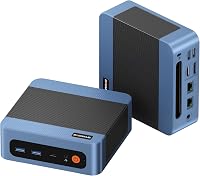
8 Best Mini PCs With 32GB of Memory (November 2026)
The best mini PCs with 32GB of memory include the GMKtec M6 Ultra mini PC (32GB) for balanced home and office use, the Minisforum UM870 Slim mini PC for multi-screen work, and the Minisforum X1 Lite mini PC for storage expansion.
On this page (8 sections)
- Which mini PC with 32GB of memory fits your needs?
- How we chose these 32GB mini PCs
- The 32GB mini PCs, compared by use
- Is 32GB enough for your mini PC?
- Do 32GB mini PCs support memory upgrades?
- How much SSD storage should a 32GB mini PC have?
- Can a 32GB mini PC handle photo editing?
- Which best mini PC 32GB should you choose?
The best mini PC with 32GB of memory for most people is the GMKtec M6 Ultra, with 32GB of DDR5, a 1TB SSD and three display outputs. Choose the GEEKOM IT15 for creative work, or the GEEKOM A7 if lower-power daily computing matters more.
A 32GB configuration can keep more apps and browser tabs open without an immediate memory upgrade. But the right mini PC also depends on storage, display connections, and whether you want newer memory or extra expansion slots.
For a broader overview, see our best mini desktop computers guide. If cost is your main filter, compare these picks with our mini PCs under 500 dollars and affordable mini PCs for browsing and email.
Our picks at a glance
-
1
 Best for balanced home and office use
GMKtec M6 Ultra mini PC (32GB)
8.9/10 our score
See it on Amazon -
2

-
3

- 4
 Best for flexible displays and portsCheck it
- 5
 Best for lower-power daily computingCheck it
- 6
 Best for creative workloadsCheck it
- 7
 Check it
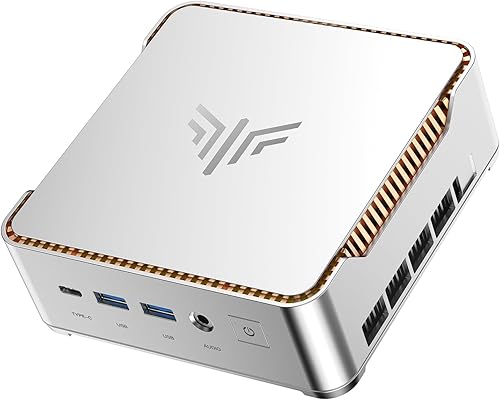
Kamrui Pinova P2 mini PC (32GB)
Best for a compact three-screen desk - 8
 Check it
Bosgame P4 Plus mini PC (32GB)
Best for a large SSD at a lower tier
Which mini PC with 32GB of memory fits your needs?
The GMKtec M6 Ultra is the most balanced pick here, while the other models suit more specific needs such as extra displays, storage expansion or creative workloads. We compared memory, included storage, processor and graphics details, display connections and upgrade options.
This guide focuses on the configurations named below. Specs can vary between configurations, so check the exact model details before ordering if a feature is essential.
| Product | Best for | Memory | Storage | Display outputs | Our score |
|---|---|---|---|---|---|
| GMKtec M6 Ultra mini PC (32GB) | balanced home and office use | 32GB DDR5 | 1TB PCIe SSD | HDMI 2.0, DisplayPort, USB4 | 8.9 |
| Minisforum UM870 Slim mini PC | multi-screen work | 32GB DDR5 | 1TB PCIe 4.0 SSD | HDMI 2.1, DisplayPort 1.4, USB4 | 8.6 |
| Minisforum X1 Lite mini PC | storage expansion | 32GB DDR5 | 1TB PCIe 4.0 SSD | HDMI 2.1, DisplayPort 1.4, USB4 | 8.5 |
| GMKtec K12 mini PC | flexible displays and ports | 32GB DDR5 | 512GB PCIe 4.0 SSD | HDMI 2.1, DisplayPort 1.4, USB-C | 8.4 |
| GEEKOM A7 mini PC (32GB) | lower-power daily computing | 32GB | 500GB PCIe Gen4 SSD | Dual HDMI and USB-C | 8.3 |
| GEEKOM IT15 mini PC | creative workloads | 32GB DDR5 | 1TB Gen4 SSD | Dual USB4 and dual HDMI | 8.2 |
| Kamrui Pinova P2 mini PC (32GB) | a compact three-screen desk | 32GB LPDDR5 | 1TB NVMe PCIe 3.0 SSD | HDMI, DisplayPort, USB-C | 7.9 |
| Bosgame P4 Plus mini PC (32GB) | a large SSD at a lower tier | 32GB DDR4 | 1TB M.2 NVMe SSD | HDMI, DisplayPort, USB-C | 7.4 |
How we chose these 32GB mini PCs
We compared the supplied product specifications against common reasons to choose 32GB: keeping several apps open, working across monitors, and leaving room for larger files or projects. We gave more weight to a balanced setup with 32GB memory, useful storage and clearly described connections.
Memory capacity alone doesn't make two mini PCs equal. DDR4 and DDR5 differ by system, and a faster processor or extra display outputs may matter more for your own workload than a higher memory ceiling.
What matters in a best mini PC 32GB setup?
A good best mini PC 32GB setup pairs its memory with enough SSD space and ports for your desk. Check whether 32GB is installed as replaceable modules, what maximum capacity the system supports and whether an upgrade uses a storage slot.
For multiple screens, compare the actual output ports and their limits. For editing or graphics tasks, look at the processor and graphics details too; 32GB of memory by itself doesn't guarantee an app will run well.
The 32GB mini PCs, compared by use
The GMKtec M6 Ultra leads for balanced home and office use, while the GEEKOM IT15 brings the strongest listed creative hardware. Match the rest of each system to the work you plan to do.
GMKtec M6 Ultra mini PC (32GB): Best for balanced home and office use
- 32GB DDR5 dual-channel memory
- 1TB PCIe SSD
- Three display outputs
- Dual 2.5G LAN
The M6 Ultra pairs 32GB of DDR5 with a 1TB SSD and three display outputs. Its dual 2.5G LAN ports may also suit a desk or small network setup.
Pros
- 32GB dual-channel DDR5
- Three simultaneous display outputs
- Dual 2.5G LAN
Cons
- Integrated graphics rather than a dedicated GPU
- Extra memory and storage upgrades are not included
The GMKtec M6 Ultra is the lead pick because its 32GB of dual-channel DDR5 comes with a 1TB PCIe SSD and a useful set of display connections. It has HDMI 2.0, DisplayPort and USB4, and can run three displays at once.
The Ryzen 5 7640HS has 6 cores and 12 threads. GMKtec pairs it with integrated Radeon 760M graphics, so this is best viewed as a compact general-purpose PC rather than a replacement for a system with a separate graphics card.
For a home office, the combination of 1TB storage and three display outputs can support a larger work area without crowding the desk. Dual 2.5G LAN ports are a less common extra that may help if you have a wired network setup.
Choose it for a balanced 32GB desktop with room to expand memory and storage. If you need a higher-core processor or a different graphics setup for editing, compare the GEEKOM IT15 below.
Minisforum UM870 Slim mini PC: Best for multi-screen work
- 32GB DDR5 memory
- 1TB PCIe 4.0 SSD
- Triple display output
- Wi-Fi 6E
The UM870 Slim combines 32GB of memory with triple-display support, including USB4 and DisplayPort. It also has two M.2 SSD slots for storage expansion.
Pros
- Three independent display outputs
- Two M.2 SSD slots
- Wi-Fi 6E and 2.5Gbps LAN
Cons
- Memory expansion requires replacing or adding compatible modules
- Display output capabilities differ by port
The Minisforum UM870 Slim suits a desk where three displays and fast wired networking matter. Its 32GB of DDR5 comes with a 1TB PCIe 4.0 SSD, plus HDMI 2.1, DisplayPort 1.4 and USB4 outputs.
Its Ryzen 7 8745H has 8 cores and 16 threads, and the system uses Radeon 780M integrated graphics. The two M.2 2280 slots provide a defined route to more SSD space, with the stated total storage support up to 4TB.
This model offers a DisplayPort output specified for 4K at 120Hz, alongside two 8K-capable outputs. Check that your monitor and cable support the resolution and refresh rate you want.
Pick it for a multi-screen desk with expansion options. For a similar display setup with OCuLink support, the Minisforum X1 Lite is the next alternative.
Minisforum X1 Lite mini PC: Best for storage expansion
- 32GB DDR5 memory
- Two M.2 SSD slots
- OCuLink port
- Triple display outputs
The X1 Lite has 32GB of DDR5 and two M.2 SSD slots. Its OCuLink port is for buyers considering an external GPU setup, with a slot used by the required adapter.
Pros
- Memory can expand to 128GB
- Two M.2 SSD slots
- OCuLink support
Cons
- OCuLink adapter uses one M.2 slot
- External GPU setup requires additional hardware
The Minisforum X1 Lite combines 32GB of DDR5 with two M.2 SSD slots and an OCuLink port. That mix makes it a fit for buyers who want storage flexibility or are considering a future external GPU setup.
Its Ryzen 7 255 has 8 cores and 16 threads, with Radeon 780M integrated graphics. The system includes a 1TB PCIe 4.0 SSD, and the memory can expand up to 128GB.
OCuLink has a practical tradeoff: the included adapter uses one M.2 slot, and the connection isn't hot-swappable. Think through whether you value the external GPU option more than an additional internal SSD slot.
Choose the X1 Lite if expansion is part of your plan. If you prefer more built-in storage slots and dual wired network ports, the GMKtec K12 may fit better.
GMKtec K12 mini PC: Best for flexible displays and ports
- 32GB DDR5 dual-channel memory
- Three M.2 slots
- Dual 2.5GbE LAN
- Up to four displays
The K12 combines 32GB of DDR5 with three M.2 storage slots and dual 2.5GbE ports. Its 512GB SSD is smaller than the 1TB drives in several other picks.
Pros
- Three M.2 storage slots
- Dual 2.5GbE LAN
- Up to four display outputs
Cons
- 512GB SSD is the smallest included drive here
- OCuLink use has a storage-slot tradeoff
The GMKtec K12 stands out for three M.2 storage slots and dual 2.5GbE LAN. It comes with 32GB of DDR5 and a 512GB PCIe 4.0 SSD, so its included drive is smaller than the 1TB drives in several picks above.
Its Ryzen 7 H 255 has 8 cores and 16 threads, with integrated Radeon 780M graphics. HDMI 2.1, DisplayPort and USB-C support up to four display outputs, according to the stated port configuration.
The OCuLink connection adds another route for an external GPU setup, but that setup competes with storage expansion. The three M.2 slots and OCuLink support give this unit more planning options than a simpler office mini PC.
Pick the K12 for wired networking and internal storage flexibility. If you mostly want everyday apps and power modes for different tasks, the GEEKOM A7 is a more modest option.
GEEKOM A7 mini PC (32GB): Best for lower-power daily computing
- 32GB memory
- 500GB PCIe Gen4 SSD
- Power modes from 10W to 30W
- Dual HDMI
The A7's 32GB of memory suits heavy multitasking, while its power modes let you match its draw to everyday tasks. Its 500GB SSD is smaller than most options here.
Pros
- Multiple power modes
- Memory can expand to 64GB
- Dual HDMI and dual USB-C
Cons
- 500GB included SSD
- Integrated Radeon graphics
The GEEKOM A7 is a good match for everyday multitasking with lower power modes. Its 32GB configuration pairs an 8-core, 16-thread Ryzen 7 7730U with a 500GB PCIe Gen4 SSD.
GEEKOM gives the A7 four power modes from 10W to 30W. That lets you choose a setting based on your tasks, while the memory can expand to 64GB and the SSD storage support goes up to 4TB.
The smaller included SSD is the main tradeoff beside the 1TB models in this guide. Dual HDMI and dual USB-C ports offer a broad set of connections, and the integrated Radeon graphics suit general use rather than a dedicated GPU workload.
Choose the A7 for daily apps and a lower-power configuration. If creative apps and a higher-end processor matter more, look at the GEEKOM IT15.
GEEKOM IT15 mini PC: Best for creative workloads
- 32GB DDR5 memory
- 1TB Gen4 SSD
- Intel Arc 140T graphics
- Quad display support
The IT15 pairs 32GB of DDR5 with an Intel Core Ultra 9 285H and Intel Arc 140T integrated graphics. Its dual USB4 and dual HDMI outputs support up to four displays.
Pros
- 1TB PCIe 4.0 SSD
- Quad-display support
- Wi-Fi 7 and 2.5GbE LAN
Cons
- Some AI features require compatible software
- Integrated graphics are not a separate graphics card
The GEEKOM IT15 is the most specialized pick here for creative work and compatible AI features. It pairs 32GB of DDR5 with an Intel Core Ultra 9 285H, Intel Arc 140T integrated graphics and a 1TB Gen4 SSD.
Its dual USB4 and dual HDMI ports support up to four displays. Wi-Fi 7 and 2.5GbE LAN also make it the most connected option for a busy desk among these picks.
The product details describe an Intel AI Boost NPU and up to 99 TOPS of combined AI compute. Those features depend on compatible software and workloads, so don't assume every AI app will use them.
Pick it for a powerful, connected workstation-style mini PC. For a less demanding desk with three 4K screens and an included VESA mount, the Kamrui Pinova P2 costs you fewer system demands.
Kamrui Pinova P2 mini PC (32GB): Best for a compact three-screen desk
- 32GB LPDDR5 memory
- 1TB NVMe SSD
- Triple 4K display support
- VESA mount included
The Pinova P2 comes with 32GB of LPDDR5 memory and a 1TB SSD. Its HDMI, DisplayPort and USB-C outputs can connect three monitors.
Pros
- Triple 4K display support
- Two storage slots
- VESA mount included
Cons
- Memory is LPDDR5
- Gigabit Ethernet rather than 2.5G LAN
The Kamrui Pinova P2 suits a compact desk with three monitor connections and a VESA mount. It includes 32GB of LPDDR5 memory, a 1TB NVMe SSD and an Intel Core i5-12600H processor.
Its HDMI, DisplayPort and USB-C ports support triple 4K display output. The system also has Wi-Fi 6 and Gigabit Ethernet, plus two storage slots that can support up to 4TB total storage.
The Pinova P2's Gigabit LAN is slower on paper than the 2.5G ports on some alternatives. Its 32GB memory is LPDDR5, so compare the system's upgrade details carefully if replaceable memory matters to you.
Choose it for a three-screen desk where the VESA mount is useful. If you want dual 2.5G ports and 32GB of DDR4, the Bosgame P4 Plus offers a different balance.
Bosgame P4 Plus mini PC (32GB): Best for a large SSD at a lower tier
- 32GB dual-channel DDR4 memory
- 1TB PCIe SSD
- Dual 2.5G LAN
- Triple display outputs
The P4 Plus offers 32GB of dual-channel DDR4 memory, a 1TB SSD and dual 2.5G LAN. Its listed memory type is DDR4, while several alternatives use DDR5.
Pros
- 1TB SSD
- Dual 2.5G Ethernet ports
- Triple display outputs
Cons
- DDR4 memory
- 1-year limited warranty
The Bosgame P4 Plus is a straightforward option for 32GB memory, 1TB storage and dual 2.5G LAN. It uses an 8-core, 16-thread Ryzen 7 5825U and 32GB of dual-channel DDR4 memory.
Its 1TB M.2 NVMe SSD can be joined by a 2.5-inch SSD, sold separately, and it has dual M.2 slots. HDMI, DisplayPort and USB-C provide three display outputs, while Wi-Fi 6E and Bluetooth 5.2 handle wireless connections.
The key distinction is DDR4 memory, while several alternatives use DDR5. The stated limited warranty is 1 year, so weigh that alongside the included storage and network ports.
Pick it if the 1TB drive and dual wired network ports match your setup. For a more complete comparison by office needs, see our small business mini PC guide.
Is 32GB enough for your mini PC?
Yes, 32GB is enough for many people who keep several everyday apps open, work in a browser, or use office tools alongside video calls. It can also suit some photo and video workflows when the processor, graphics and storage match the software.
If your workload is mostly email, streaming and light browsing, a 32GB configuration may be more memory than you need. Our mini PCs for home use guide can help you compare simpler everyday systems.
Do 32GB mini PCs support memory upgrades?
Some do, but the maximum and memory type vary. The M6 Ultra supports expansion up to 128GB, the A7 up to 64GB, and the X1 Lite up to 128GB; check the system's memory layout before planning an upgrade.
The Kamrui Pinova P2 uses LPDDR5, so don't assume its memory can be changed like a system with SO-DIMM slots. Our guide to whether mini PCs use laptop RAM explains the formats and upgrade details to check.
How much SSD storage should a 32GB mini PC have?
A 1TB SSD gives more room for software, downloads and media than a 500GB or 512GB drive. For large photo or video libraries, also check for open M.2 slots or external storage options.
The K12 includes 512GB, while the GEEKOM A7 includes 500GB. The K12 has three M.2 slots; the A7 supports up to 4TB SSD storage.
Can a 32GB mini PC handle photo editing?
A mini PC with 32GB can work for photo editing, but memory isn't the only factor. The processor, integrated graphics, storage and monitor connections all shape how the system fits an editing workflow.
For a closer look at hardware aimed at that use, see our guide to mini PCs for photo editing. Keep large source files on a drive with enough space, and confirm the software's requirements before choosing a system.
Which best mini PC 32GB should you choose?
Choose the GMKtec M6 Ultra for a balanced 32GB system with 1TB storage, three displays and dual 2.5G LAN. Pick the GEEKOM IT15 for its higher-end processor and quad-display support, or the GEEKOM A7 for everyday multitasking with lower power modes.
If storage expansion is a priority, compare the Minisforum X1 Lite and GMKtec K12. For more budget-focused options, continue to our guides to mini PCs under 500 dollars and affordable mini PCs.
Our top 3 picks at a glance
-
1
Best for balanced home and office use
GMKtec M6 Ultra mini PC (32GB)
8.9/10 our score
See it on Amazon -
2
-
3
Frequently asked questions
Is 32GB of RAM enough for a mini PC?
Yes, 32GB is enough for many home and office workloads, including several open apps, browser tabs, video calls and everyday creative work. It also gives you more room for multitasking than 16GB.
For specialized software or unusually large projects, check the program's memory needs before choosing a system.
Should I choose DDR4 or DDR5 in a 32GB mini PC?
Choose based on the full system and your workload, not the memory label alone. Several picks here use DDR5, while the Bosgame P4 Plus uses DDR4.
Compare processor, storage, ports and upgrade options as well as memory type, since those features shape how a mini PC fits your setup.
Can you upgrade memory in a mini PC?
Some mini PCs support memory upgrades, but the limit and memory format vary by model. The GMKtec M6 Ultra supports expansion up to 128GB, while the GEEKOM A7 supports up to 64GB.
Check whether the system uses replaceable modules and whether the stated maximum fits your needs before you buy.
Is a 32GB mini PC good for video editing?
A 32GB mini PC can suit some video editing workflows, especially when paired with a capable processor, enough storage and suitable display connections. The GEEKOM IT15 lists an Intel Core Ultra 9 285H, Arc 140T graphics and a 1TB SSD.
Software, footage resolution and project size affect performance, so match the whole system to your editing workload.
How much storage should a 32GB mini PC have?
Choose storage based on the size of your apps, documents and media files. A 1TB SSD gives more room than the 500GB GEEKOM A7 or 512GB GMKtec K12, and several picks offer extra M.2 slots.
If you keep large video or photo libraries, check expansion options or plan for external storage.