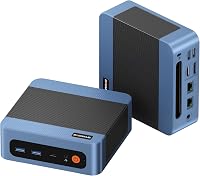
9 Best Mini Computers for Everyday Home Use (November 2026)
The best mini computers for everyday home use include the ACEMAGIC K1 mini PC for an all-around home setup, the GEEKOM A5 mini PC for heavier multitasking, and the Bosgame E7 mini PC for a wired home office.
On this page (3 sections)
The best mini computer for home use is the ACEMAGIC K1 for a balanced setup, with 16GB memory, a Ryzen 3 Pro 7330U and support for up to 3 displays. If you run many apps at once, the GEEKOM A5 has an 8-core Ryzen 7 and memory you can expand.
For routine browsing, homework and streaming, a compact PC can take up less desk space than a tower. Your monitor, keyboard and mouse are separate, so include those in your setup plan.
This roundup compares 9 models by processor, memory, storage, display outputs and connectivity. Our score weighs specs and features against the needs of someone shopping for a home computer.
Our picks at a glance
-
1

-
2

-
3

Which mini computer is best for everyday home use?
The ACEMAGIC K1 is the best balanced choice for a typical home setup, while the GEEKOM A5 suits busier workloads and the Beelink Mini S13 covers routine tasks. Pick by the apps you use and the number of screens you plan to connect.
ACEMAGIC K1 mini PC: Best for an all-around home setup
- Ryzen 3 Pro 7330U
- 16GB non-expandable memory
- 256GB M.2 SSD
- HDMI, DisplayPort and USB-C video
A compact everyday PC with 16GB memory, multiple video outputs and a built-in power supply. Its memory is not expandable.
Pros
- Three display outputs
- Built-in power supply
- Extra M.2 storage can be added
Cons
- Memory is non-expandable
- Wi-Fi 5 and Bluetooth 4.2
The ACEMAGIC K1 combines a Ryzen 3 Pro 7330U processor with 16GB of LPDDR4 memory and a 256GB M.2 SSD. Its memory is not expandable, so choose a model with upgradeable RAM if you expect to add more later.
HDMI, DisplayPort and USB-C video outputs support up to 3 displays. The built-in power supply also removes the need for an external power adapter, which can keep a desk setup tidier.
It fits browsing, office tasks, schoolwork and home entertainment. Wi-Fi 5 and Bluetooth 4.2 are older wireless standards than the Wi-Fi 6 and Bluetooth 5 options on some picks here.
GEEKOM A5 mini PC: Best for heavier multitasking
- Ryzen 7 7730U
- 16GB memory, upgradable to 64GB
- 256GB PCIe NVMe SSD
- Supports up to 4 displays
The Ryzen 7 and upgradeable memory suit busy home workdays with many browser tabs or large spreadsheets. It also offers several ways to expand storage.
Pros
- Memory supports upgrades up to 64GB
- Multiple storage expansion options
- Wi-Fi 6 and Bluetooth 5.4
Cons
- The listed starting SSD is 256GB
- Four display setup may exceed typical home needs
The GEEKOM A5 is the most capable multitasking pick in this group, with a Ryzen 7 7730U, 8 cores and 16 threads. Its 16GB of DDR4 memory can be upgraded to 64GB, which gives you room to expand as your workload changes.
It supports up to 4 displays through dual HDMI and dual USB-C ports. Storage can also grow through its M.2 slots and 2.5-inch drive bay, making it a fit for a home office with large files or several screens.
The starting 256GB SSD may feel limited if you keep a large photo or video library on the computer. Consider an added drive or external storage if those files need to stay close at hand.
Bosgame E7 mini PC: Best for a wired home office
- Intel Core 3 100U
- 16GB DDR4 and 512GB NVMe SSD
- Dual Gigabit Ethernet
- Up to 3 displays
A useful fit for a home desk with several screens and wired network needs. It includes a 512GB SSD and supports memory upgrades.
Pros
- Dual Gigabit Ethernet ports
- 16GB memory can expand to 64GB
- 512GB SSD
Cons
- Wi-Fi 6 is useful only if the router supports it
- Three displays may be unnecessary for simple browsing
The Bosgame E7 suits a home office where wired networking and added storage flexibility matter. It has an Intel Core 3 100U, 16GB DDR4 memory and a 512GB NVMe SSD, with memory support up to 64GB.
HDMI, DisplayPort and USB-C provide up to 3 display outputs. Two Gigabit Ethernet ports add flexibility for a wired setup, though most homes using one network cable may not need both.
Its 512GB drive gives you more built-in space than the 256GB starting drives on several picks. That can help if you keep documents and applications on the computer rather than relying mostly on cloud storage.
Beelink Mini S13 mini PC (16GB): Best for routine tasks on 2 screens
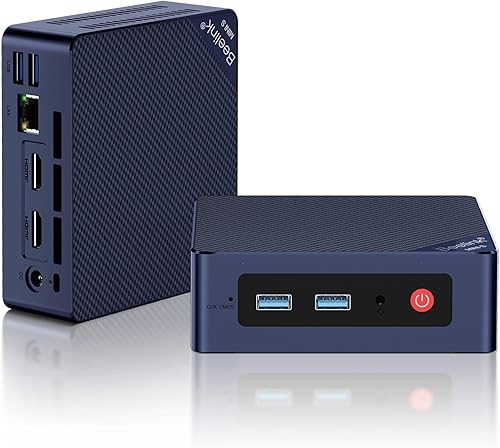
- Intel N150 processor
- 16GB DDR4 and 500GB SSD
- Dual HDMI for 2 displays
- Wi-Fi 6 and Bluetooth 5.2
For browsing, office work and home entertainment, this lower-power model pairs 16GB memory with a 500GB SSD. Dual HDMI makes a two-screen setup straightforward.
Pros
- 500GB SSD
- Dual HDMI outputs
- Wi-Fi 6
Cons
- N150 is aimed at routine computing
- Four cores and four threads
For routine tasks across 2 screens, the Beelink Mini S13 offers 16GB memory and a 500GB SSD. Its Intel N150 processor has 4 cores and 4 threads, and the computer supports 4K output at up to 60Hz on both HDMI screens.
Wi-Fi 6 and Bluetooth 5.2 cover wireless networking and peripherals. The compact unit also includes a VESA mounting bracket, so you can attach it behind a compatible monitor.
The N150 is aimed at everyday computing, not demanding creative work. If photo or video editing is part of your routine, compare the more capable processors in our mini PCs for photo editing guide.
Beelink SER5 mini PC: Best for mixed work and media
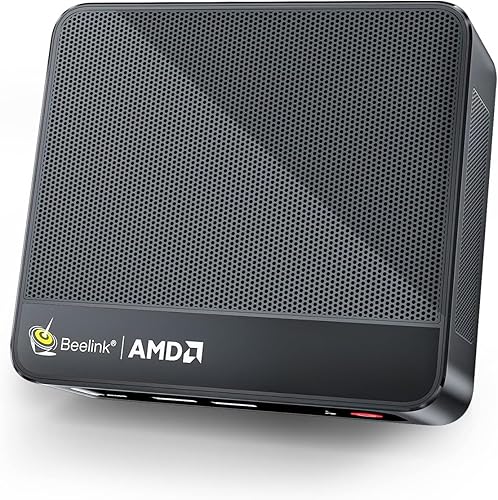
- Ryzen 5 5500U
- 16GB DDR4, upgradable to 64GB
- 480GB NVMe SSD
- Dual display support
The 6-core Ryzen 5 and upgradeable memory offer room for more demanding multitasking than basic browsing. It can drive 2 screens and includes a USB-C port with data and video.
Pros
- Memory supports upgrades up to 64GB
- Six cores and 12 threads
- USB-C supports data and video
Cons
- Wi-Fi 5 rather than Wi-Fi 6
- Only 2 display outputs are described
The Beelink SER5 is a good fit for mixed home work and media use, with a Ryzen 5 5500U and 6 cores with 12 threads. Its 16GB DDR4 memory can be expanded to 64GB, and the 480GB NVMe SSD gives you room for apps and files.
It supports 2 screens and includes a USB-C port that carries data and video. Integrated Radeon Graphics are described for 4K playback and light gaming, but this is not a dedicated graphics card.
Beelink specifies Wi-Fi 5 and Bluetooth, plus a 2.5G LAN port. The Wi-Fi standard is older than Wi-Fi 6, so consider how your wireless network and placement affect your connection.
GMKtec G3S mini PC: Best for a simple dual-screen desk

- Intel N95 processor
- 8GB DDR4 and 256GB SSD
- Dual HDMI
- Wi-Fi 5 and Bluetooth 5.0
The G3S covers routine computing with dual HDMI and a small footprint. Its 8GB memory and 256GB SSD make it a simpler fit than the options above.
Pros
- Dual HDMI
- Supports Wake on LAN and auto power on
- VESA mount included
Cons
- 8GB memory is the smallest amount here
- Wi-Fi 5
The GMKtec G3S is a basic home computer option with dual HDMI, a VESA mount and 8GB of DDR4 memory. Its Intel N95 processor is suited to routine tasks such as browsing, office work and home entertainment.
Two HDMI 2.0 ports support 4K at 60Hz on 2 screens. Wi-Fi 5, Bluetooth 5.0 and Gigabit Ethernet cover the common ways to connect it to a home network.
The 8GB memory and 256GB SSD are modest starting capacities. It can suit a simple desk or media setup, but choose a 16GB option if you often keep many browser tabs and apps open.
Bosgame E5 Plus mini PC: Best for future memory upgrades

- Ryzen 3 5400U
- 8GB DDR4, upgradable to 64GB
- Two M.2 storage slots
- Up to 3 displays
Two memory slots and an extra M.2 slot give this model upgrade paths for a home PC that may need more capacity later. It starts with 8GB memory.
Pros
- Memory can expand to 64GB
- Extra M.2 NVMe slot
- Up to 3 display outputs
Cons
- Starts with 8GB memory
- Wi-Fi 5
The Bosgame E5 Plus makes sense if you want memory and storage expansion options. It starts with 8GB DDR4 memory and a 256GB SATA SSD, with two SODIMM slots supporting up to 64GB and an extra M.2 NVMe slot.
Its Ryzen 3 5400U has 4 cores and 8 threads. HDMI, DisplayPort and USB-C can connect up to 3 displays, which may help if you use separate screens for work and reference material.
The 8GB starting memory is the main tradeoff for a home computer. If you do not plan to upgrade, one of the 16GB models may be a better out-of-box fit.
Kamrui AK1 Plus mini PC: Best for a compact family computer

- Intel Celeron N5095
- 16GB LPDDR4X and 256GB SSD
- Dual HDMI for 2 displays
- Expandable storage
This compact PC combines 16GB memory with dual HDMI for everyday family use. It also supports added M.2 and 2.5-inch storage.
Pros
- 16GB memory
- Dual HDMI outputs
- Storage expansion options
Cons
- Celeron N5095 is an older entry-level processor
- Wi-Fi standard is not specified in the product facts
The Kamrui AK1 Plus suits a compact family computer for web browsing, online classes, email and video calls. It combines 16GB LPDDR4X memory with dual HDMI and a 256GB M.2 SSD.
The two HDMI 2.0 ports support dual 4K displays. Storage can be expanded with an M.2 drive and a 2.5-inch SATA drive, giving you options for photos, videos and local files.
Its Intel Celeron N5095 is a 4-core, 4-thread processor, so it is best matched to everyday tasks. The product facts do not specify its Wi-Fi generation, so check compatibility if newer wireless features matter to you.
GMKtec G11 mini PC: Best for advanced home networking

- Ryzen Embedded R2514
- 16GB dual-channel DDR4
- Dual 2.5GbE ports
- Up to 3 displays
The dual 2.5GbE ports and dual-channel memory make this a specialized choice for a home network lab or multi-screen setup. It may be more than a typical family PC needs.
Pros
- Dual 2.5GbE ports
- Wi-Fi 6E and Bluetooth 5.2
- Supports up to 3 displays
Cons
- Networking features may go unused on a basic home PC
- Storage capacity is not specified here
The GMKtec G11 is a specialized pick for a home network lab or multi-screen desk. Its dual 2.5GbE ports can suit buyers who want more wired networking options, and it supports up to 3 displays.
The Ryzen Embedded R2514 is paired with 16GB of dual-channel DDR4 memory. Wi-Fi 6E and Bluetooth 5.2 add wireless options, while USB-C and dual HDMI provide video connections.
For a typical home PC used for email, streaming and schoolwork, these networking features may go unused. Storage capacity also varies by configuration, so confirm the version that meets your needs.
How should you choose a mini computer for home use?
Choose a mini computer by matching its processor and memory to your everyday apps, then check storage and monitor ports. Features like extra Ethernet ports matter only if you have a use for them.
What should a mini PC have for home use?
A mini PC for home use should have enough memory for your open apps, storage for your files, and the ports your monitor and accessories need. For many buyers, 16GB memory is a sensible starting point.
Eight gigabytes can cover simpler tasks, but it leaves less room for multitasking. If your budget and needs allow, compare 16GB options such as the ACEMAGIC K1 and Beelink Mini S13 with the expandable GEEKOM A5.
Storage needs depend on where your files live. A 256GB drive can suit basic apps and documents, while a 500GB drive gives you more local room for files, downloads and media.
How much processor power do everyday tasks need?
Browsing, email and video meetings do not need the same processor as heavy editing or large spreadsheets. The N150 and N95 options here are positioned for routine computing, while Ryzen 5 and Ryzen 7 models provide more cores and threads.
For a family computer that mostly runs a browser and office apps, start with a modest processor and adequate memory. If you often work across many apps, look at the GEEKOM A5 or Beelink SER5.
For video editing, check the processor and graphics fit before buying. Our mini PC video editing guide covers options aimed at that more demanding task.
How many monitor ports do you need?
One monitor is enough for many home desks, but a second can make it easier to keep a video call and documents visible together. The Beelink Mini S13 and Kamrui AK1 Plus each offer dual HDMI, while several other picks support 3 or 4 displays.
Count the displays you want to use, then match their inputs to the computer's video ports. Some models use USB-C for video, so make sure the specific port and cable work with your screen.
If two displays are part of your setup, see our guide to mini PC dual monitor support for port and cable details.
Is expandable memory or storage useful?
Expandable components help if you expect your needs to grow, but they are less important if the starting configuration already fits. The GEEKOM A5 and Bosgame E7 support memory upgrades, while the ACEMAGIC K1 has non-expandable memory.
For storage, the GEEKOM A5, Bosgame E7, Bosgame E5 Plus and Kamrui AK1 Plus include expansion paths. Check whether you prefer to add storage later or start with a larger drive already installed.
Should you choose a mini PC or a tower?
A mini PC is a good match when you want a small computer for everyday apps and do not need a large internal expansion space. A tower gives you more room to add components, which may matter for dedicated graphics or future upgrades.
The right choice depends on what you plan to connect and run. Our mini PC versus desktop guide walks through the main tradeoffs.
Which mini computer should you choose for home?
Choose the ACEMAGIC K1 for a balanced everyday setup with 16GB memory and 3 display outputs. Pick the GEEKOM A5 for heavier multitasking and upgrade options, or the Beelink Mini S13 for routine work on 2 screens.
If you want to compare form factors before deciding, read our home guide to mini desktop computers. For more options by price, see mini PCs under 500 dollars.
Our score weighs specs and features against what you're shopping for.
Our top 3 picks at a glance
-
1
-
2
-
3
Frequently asked questions
What is the best mini computer for home use?
The best fit depends on your daily tasks. The ACEMAGIC K1 balances everyday computing with 16GB memory and 3 display outputs, while the GEEKOM A5 has a stronger 8-core processor and upgradeable memory for heavier multitasking.
For browsing, email and streaming, the Beelink Mini S13 is a simpler option.
How much memory does a home mini PC need?
For general browsing, email and office work, 16GB is a useful starting point if you keep several apps open. The GMKtec G3S and Bosgame E5 Plus start with 8GB, while several other picks include 16GB.
If you expect heavier multitasking, check whether the memory can be upgraded.
Can a mini PC replace a desktop computer?
A mini PC can handle many home tasks, including web browsing, office work, video meetings and media playback. The right choice depends on the processor, memory, storage and ports you need.
A tower may suit you better if you need a dedicated graphics card or more room for internal upgrades.
See our guide to mini PCs versus desktop computers.
Can a mini PC run 2 monitors?
Yes, several models here support 2 or more screens. The Beelink Mini S13 has 2 HDMI outputs, while the ACEMAGIC K1 supports up to 3 displays through HDMI, DisplayPort and USB-C.
Check the ports on your monitor and choose matching cables.