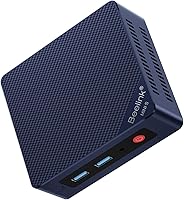
Is a Mini PC as Good as a Desktop for Home Use?
For everyday home use, a mini PC can be as good as a desktop if its processor, memory, and ports match your needs. A tower is a better fit when you want more room for upgrades or a larger case.
On this page (6 sections)
For everyday home use, a mini PC can be as good as a desktop if its processor, memory, storage, and ports suit your tasks. A tower makes more sense when you want a larger case or expect to add parts later.
A mini PC is a small desktop computer, so you still connect it to a monitor, keyboard, and mouse. The main tradeoff is space: a compact case takes up less room, while a tower usually offers more room inside for parts and airflow.
Is a mini PC as good as a desktop for everyday tasks?
Yes, a mini PC can handle common home tasks just as well as a tower with suitable hardware. Web browsing, email, office documents, video calls, and streaming usually don't require a large case.
Compare the processor, memory, and storage before comparing size. More demanding work, such as editing video or running several heavy programs at once, calls for closer attention to those parts and the graphics hardware.
For an overview of the category, see what a mini computer is. If you want a shortlist for routine household tasks, our guide to mini computers for home use covers that use case.
What does a mini PC do better than a tower?
A mini PC saves desk space and is easier to place in a compact work area. Some models can attach behind a monitor with a VESA mount, which can clear the desktop.
That small size can suit a shared desk, a study corner, or a home theater setup. Check the exact ports and mounting support, since features vary by model.
The GEEKOM A8 has 16GB of DDR5 memory and a 1TB SSD. GEEKOM says its memory can be upgraded up to 128GB and storage up to 4TB, which gives it a stated path for expansion within its compact format.
A smaller case isn't automatically quieter or cooler. Check the model's cooling design and consider where you'll place it, especially if it will sit close to you during long work sessions.
When is a desktop tower a better choice?
A tower is a better fit if you want a larger case and room to work with internal parts. Its size may also be easier to accommodate if you want a traditional desktop arrangement under or beside a desk.
A tower can still be a sensible everyday home computer. The HP Desktop Tower 290 G9 comes with a wired keyboard and mouse, and its listed configuration includes 8GB of memory and a 256GB SSD.
HP describes the 290 G9 for everyday office tasks such as email, documents, spreadsheets, and web browsing. Its HDMI and VGA outputs support modern and legacy monitors, so check which connection your screen uses.
For a more detailed comparison of case size and use, read mini PC vs tower PC. If you already know you want a small format, our mini desktop computer guide can help you compare options.
What do you give up with a mini PC?
A mini PC gives you less room inside the case for upgrades and add-on parts. Some models still allow memory or storage upgrades, but the limits depend on the specific computer.
Look for stated upgrade support, available ports, and the number of displays you need. Don't assume every mini PC uses laptop parts or has the same expansion options; check the model details.
The GMKtec M5 Ultra has 16GB of DDR4 memory and a 256GB SSD, with support for memory expansion to 64GB and dual storage slots supporting up to 4TB total, according to GMKtec. It also has two 2.5G Ethernet ports and can connect to three displays.
The M5 Ultra uses integrated Radeon graphics. That can suit general desktop use, but a buyer who needs a dedicated graphics card should check tower options and confirm graphics requirements for their software.
Which computer fits a home office?
Choose based on your daily tasks, available desk space, and the connections your setup needs. A mini PC fits a tidy desk; a tower can suit you better if you want a larger chassis or more room for components.
For office work, confirm that the system has enough memory for your usual apps and enough storage for your files. Check Wi-Fi or Ethernet, display outputs, and whether a keyboard and mouse are included.
A mini PC may be a good home office choice when you mainly work with documents, email, browser tabs, and video calls. For specialized work, compare the software requirements with the exact processor and graphics configuration.
Is a mini PC worth choosing over a desktop?
Pick a mini PC when compact size and its available features cover your needs. Pick a tower when you prefer a larger case or expect to add internal parts.
Before you decide, compare memory, storage, ports, display support, and included accessories. Then check the best mini computers for home use or compare a mini PC with a tower PC for your desk and workload.
Frequently asked questions
Are mini PCs as good as desktops for everyday use?
They can be, if the mini PC has enough memory, storage, ports, and processing power for your everyday tasks. Web browsing, email, video playback, and office work are common fits.
A tower may be a better match if you need more room for upgrades or a dedicated graphics card.
What are the downsides of a mini PC?
A mini PC has less space inside than a tower, which can limit upgrades and cooling options. Check the exact memory and storage upgrade support, display connections, and network ports before buying.
You may also need to supply a monitor, keyboard, and mouse, depending on what comes with it.
Is a mini PC powerful enough for home office work?
Many mini PCs can handle home office tasks, but the right choice depends on the programs you use and how many you run at once. Compare the processor, memory, and storage, then check whether it has the ports and network connection your desk requires.
Should I buy a mini PC or desktop tower?
Choose a mini PC when a small footprint suits your desk and its features cover your tasks. Choose a tower when you value a larger case and possible room for future upgrades.
Compare the ports, included accessories, memory, and storage before deciding.