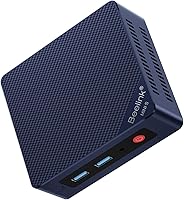
Should I Buy a Mini PC? Who It Suits and Who It Doesn't
A mini PC suits you if you want a small computer for everyday work, browsing, or media and already have a monitor and accessories. Choose a larger desktop if you need room for major upgrades or demanding graphics.
On this page (7 sections)
A mini PC suits you if you want a small computer for everyday work, browsing, or media and already have a monitor and accessories. Choose a larger desktop if you need room for major upgrades or demanding graphics.
The short answer to “should I buy a mini PC?” depends on your tasks and what you already own. Small size can make a desk easier to arrange, but it doesn't automatically mean the computer fits every workload or saves money once you add missing accessories.
Who should buy a mini PC?
Buy a mini PC if you mainly browse the web, use office apps, handle email, or stream video. These everyday tasks can fit a compact system, provided its processor, memory, storage, and ports match your needs.
A small computer may also suit a shared desk, a compact home office, or a setup where you want the computer out of the way. Some models include a VESA mount for placing the computer behind a monitor, but check the exact model and mounting needs first.
If you use two screens, count the video outputs before you buy. The mini PC dual monitor guide explains how ports, cables, and displays work together.
Who should choose a different computer?
Choose a tower desktop or a purpose-built workstation if you need a high-end graphics card, extensive upgrades, or room for many internal drives. A small case limits how much hardware can fit inside.
A mini PC may not be the right choice for demanding games, high-end video work, or 3D tasks that need powerful dedicated graphics. Compare the computer's graphics and processor with the requirements of your apps before deciding.
For a closer look at the size and upgrade trade-offs, see mini PC vs tower PC. If you're still weighing compact and traditional desktops for general home use, is a mini PC as good as a desktop? covers that decision.
What should you check before you buy?
Match the computer's processor, memory, storage, ports, and operating system to the tasks you plan to do. A compact shape tells you little about how well a particular model will fit your work.
Start with your current computer and make a list of what it handles every day. Note the apps you use, how many browser tabs you keep open, your display setup, and how much storage you need.
Will a mini PC handle your everyday tasks?
A mini PC can handle routine tasks when its hardware suits the apps you use. For example, the GMKtec G3S mini PC has an Intel N95 processor, 8GB of memory, and a 256GB SSD, with two HDMI ports for connecting displays.
This model may suit browsing, office work, and home entertainment. Its 8GB of memory and 256GB SSD may feel limiting if you work with large files or keep many demanding apps open.
Check the exact tasks you plan to run before choosing any entry-level computer. For more options matched to common home tasks, browse mini PCs for everyday home use.
Do you need more memory or storage?
Check both the amount of memory and whether it can be upgraded. For example, the ACEMAGIC K1 mini PC has 16GB of memory that isn't expandable, along with a 256GB SSD and room to add an M.2 SSD.
This K1 may suit someone who wants a compact system with more memory from the start and several display connections. Since the memory can't be expanded, choose carefully if you expect to need more later.
Think about storage separately from memory. If you save large video, photo, or game files locally, compare the drive size with your current use and look for a model that offers the kind of storage expansion you want.
Do you already have a monitor and accessories?
A mini PC usually needs a separate monitor, keyboard, and mouse. If you already own those items, you may be able to connect them; if not, include them in your setup plan.
The Logitech MK270 keyboard and mouse combo includes a full-size keyboard and a compact wireless mouse. Its USB receiver connects the pair to a computer with a compatible USB-A port.
Check your computer's ports and the accessories you own before buying. If you'll connect a TV instead of a monitor, follow the steps in how to connect a mini PC to a TV.
Is a mini PC a good fit for your desk?
A mini PC is a practical fit when desk space is limited and you can place the computer near its ports, power, and network connection. Measure the space you plan to use, including room for cables and airflow.
Some models support VESA mounting, which can place the computer behind a compatible display. Others may need to sit on the desk or a shelf, so check the mounting options and leave room around the vents.
Consider the rest of your desk, too. A small computer won't make the whole setup compact if you still need a large monitor, speakers, or several peripherals.
Is a mini PC reliable enough for daily use?
A mini PC can serve as a daily computer when its hardware matches your workload and it has room to stay cool. Reliability depends on the model, how you use it, and the support available.
Check the brand's warranty terms and support options before buying. Keep the computer's vents clear, use the power supply meant for it, and avoid placing it where dust or heat can build up.
For more on common reliability questions, read are mini PCs reliable enough for daily use?. A compact computer isn't automatically fragile, but it also isn't a guarantee of long service.
Should I buy a mini PC or a laptop?
Choose a mini PC if you need a stationary computer and already have, or want to choose, a separate monitor and keyboard. Choose a laptop if you need a built-in screen and the freedom to work in different places.
A mini PC can stay connected to a desk setup, TV, or other compatible display. A laptop combines the computer, screen, keyboard, battery, and pointing device in one portable unit.
Compare the complete setup you need, not only the computer's size. If you need to carry your work, a laptop may be simpler; if the computer will stay in one spot, a mini PC may fit better.
How do you decide whether a mini PC is worth buying?
Buy a mini PC for everyday tasks and a compact desk when its ports and hardware meet your needs. Skip it if your work depends on major upgrades, powerful dedicated graphics, or built-in portability.
Before you decide, write down your tasks, check your current accessories, and confirm the memory, storage, display outputs, and mounting options. A small form factor is useful only when the specific computer fits your routine.
For a plain-language overview of the category, see what a mini computer is. If a compact computer fits your plans, compare the best mini desktop computers before choosing a model.
Frequently asked questions
Should I buy a mini PC for everyday home use?
A mini PC can suit everyday home use if your tasks are browsing, email, documents, video playback, and light office work. Check the computer's memory, storage, ports, and operating system against your needs, and remember that you'll need a separate display, keyboard, and mouse unless you already have them.
Is a mini PC good for gaming?
A mini PC with integrated graphics may suit casual games, but it may not meet the needs of demanding modern games. Check the requirements for the games you play and compare them with the computer's processor and graphics.
If gaming performance or upgrades matter most, consider a desktop with room for a separate graphics card.
Do mini PCs come with a monitor, keyboard, and mouse?
Some mini PC packages include a power adapter, cable, or mounting bracket, but the computer itself doesn't replace a monitor, keyboard, and mouse. Check what comes in the box and plan for any accessories you still need.
A wireless keyboard and mouse combo can help complete a basic desk setup.
Are mini PCs easy to upgrade?
Upgrade options vary by model. Some mini PCs allow storage changes, while memory may be fixed or difficult to access.
Check the exact model's memory and storage details before buying, especially if you expect to add more space or keep the computer for several years.