8 Best Affordable Mini PCs for Browsing and Email (November 2026)
The best affordable mini PCs for browsing and email include the Bosgame E5 11 Pro mini PC for browser tabs and email, the Bosgame E5 mini PC (16GB) for heavier everyday multitasking, and the Beelink SER3 mini PC for dual-screen browsing.
On this page (7 sections)
- How we chose affordable mini PCs for browsing and email
- Compare the affordable mini PCs
- The best affordable mini PCs for everyday browsing
- What should you check before buying a low-cost mini PC?
- Is 8GB enough for browsing and email?
- Should you choose a mini PC with 256GB or 512GB storage?
- Verdict: which affordable mini PC fits your routine?
The best affordable mini PC for browsing and email is the Bosgame E5 11 Pro, with a Ryzen 3 5300U, 8GB of memory and a 256GB SSD. Choose the 16GB E5 if you keep more apps open, the Beelink Mini S12 for basic home tasks, or a GMKtec G10 for three display outputs.
These small desktops can handle a browser, email, documents and streaming without taking up the space of a tower PC. The right fit depends on how many apps you use at once, how much file space you need and how many displays you plan to connect.
For a broader look at everyday tasks, see our guide to mini computers for home use. If you’re comparing options across a wider budget range, start with mini PCs under 500 dollars.
Our picks at a glance
-
1

-
2

-
3

How we chose affordable mini PCs for browsing and email
We compared processor, memory, storage and display connections against common home tasks such as browsing, email and document work. Our score weighs specs, features and buyer feedback against what you’re shopping for.
For this use, 8GB of memory is a practical starting point, while 16GB gives you more room to keep several tabs and programs open. A 256GB SSD is suitable for a small collection of apps and files, while 500GB or 512GB leaves more local storage.
We also considered the display connections. HDMI is common for a single monitor, while two or more display outputs can help if you want email and a browser visible at the same time.
Compare the affordable mini PCs
The biggest differences are memory, storage and display outputs. Use this table to narrow the choices, then check the individual descriptions for the details that matter most to your desk.
| Product | Best for | Processor | Memory | Storage | Our score |
|---|---|---|---|---|---|
| Bosgame E5 11 Pro mini PC | browser tabs and email | AMD Ryzen 3 5300U | 8GB DDR4 | 256GB M.2 SSD | 8.3 |
| Bosgame E5 mini PC (16GB) | heavier everyday multitasking | AMD Ryzen 3 5300U | 16GB DDR4 | 512GB NVMe SSD | 8.2 |
| Beelink SER3 mini PC | dual-screen browsing | AMD Ryzen 3 3200U | 16GB DDR4 | 500GB SSD | 8.0 |
| GMKtec G10 mini PC | more memory and displays | AMD Ryzen 5 3500U | 16GB DDR4 | 256GB M.2 SSD | 7.8 |
| GMKtec Ryzen 5 3500U mini PC | larger starting storage | AMD Ryzen 5 3500U | 16GB RAM | 512GB SSD | 7.7 |
| Beelink Mini S12 mini PC | basic browsing | Intel N95 | 8GB DDR4 | 256GB SSD | 7.6 |
| Bosgame E2 Plus mini PC | everyday home tasks | AMD Ryzen 5 3501U | 8GB DDR4 | 256GB SATA SSD | 7.5 |
| GMKtec G3S mini PC (8GB) | compact two-screen setups | Intel N95 | 8GB DDR4 | 256GB M.2 SSD | 7.4 |
The best affordable mini PCs for everyday browsing
The Bosgame E5 models lead this group because their Ryzen 3 5300U processor combines 4 cores and 8 threads with useful upgrade options. The remaining picks suit different priorities, from dual-screen browsing to extra starting storage.
Bosgame E5 11 Pro mini PC: Best for browser tabs and email
- AMD Ryzen 3 5300U, 4 cores and 8 threads
- 8GB DDR4 memory
- 256GB M.2 SSD
- Windows 11 Pro
The Ryzen 3 5300U and Windows 11 Pro make this a capable base for browsing, email and everyday office tasks. Dual memory slots and a second M.2 slot leave room to expand later.
Pros
- 4-core, 8-thread processor
- Second M.2 SSD slot
- Three display outputs
Cons
- Starts with 8GB of memory
- The second SSD is an added upgrade
The Bosgame E5 11 Pro is the best fit here if you want a capable everyday computer and may add memory or storage later. Its Ryzen 3 5300U processor has 4 cores and 8 threads, and the system includes 8GB DDR4 memory and a 256GB M.2 SSD.
For browsing and email, that combination gives you a clear starting point without requiring a higher memory configuration. Bosgame says the two SODIMM slots support up to 64GB of memory, and an empty second M.2 slot can take an additional SSD.
Its HDMI 2.0, DisplayPort and full-function USB-C outputs support up to three 4K displays at 60Hz. Most people only need one screen, but the extra connections may help if your workspace grows.
The unit comes with Windows 11 Pro and a VESA mount. Choose it for everyday use with room to expand, and consider the 16GB E5 below if you know you'll keep many apps open together.
Bosgame E5 mini PC (16GB): Best for heavier everyday multitasking
- AMD Ryzen 3 5300U, 4 cores and 8 threads
- 16GB DDR4 memory
- 512GB NVMe SSD
- Dual 2.5GbE LAN
This E5 configuration doubles the memory and storage of the 8GB option. It suits a busy browser with documents, email and other apps open together.
Pros
- 16GB memory from the start
- 512GB SSD
- Extra M.2 slot
Cons
- More capacity than basic browsing may need
- Memory and storage upgrades are separate choices
The Bosgame E5 with 16GB is the better match for someone who keeps a browser, email, video call and documents open at the same time. It uses the same Ryzen 3 5300U as the top pick but starts with 16GB of DDR4 memory and a 512GB NVMe SSD.
That extra capacity gives you more breathing room for multitasking and saved files. It also retains the E5's second M.2 slot, two 2.5GbE LAN ports and display connections for HDMI, DisplayPort and USB-C.
The 16GB configuration costs you less effort if you don't want to upgrade the memory right away. Its 512GB SSD also gives you twice the starting space of the 256GB version.
For straightforward email and a few tabs, the 8GB model may be enough. Choose this one if your everyday routine tends to keep more windows open or you store more files on the computer.
Beelink SER3 mini PC: Best for dual-screen browsing
- AMD Ryzen 3 3200U, 2 cores and 4 threads
- 16GB DDR4 memory
- 500GB SSD
- Two HDMI ports
The SER3 combines 16GB of memory with two HDMI outputs for a two-screen desk. Its 2-core, 4-thread processor is a more modest fit for simple tasks than the E5 models.
Pros
- 16GB memory
- 500GB SSD
- Two HDMI ports
Cons
- 2-core, 4-thread processor
- Memory upgrades top out at 32GB
The Beelink SER3 is a good match for a two-monitor setup and a browser-heavy routine. It comes with 16GB of memory, a 500GB SSD and two HDMI ports, so you can put email on one screen and web pages or documents on the other.
Its Ryzen 3 3200U has 2 cores and 4 threads, fewer than the Ryzen 3 5300U in the Bosgame E5 models. That makes the SER3 a more modest choice for heavier multitasking, though its 16GB of memory can help when several everyday apps are open.
Beelink says the memory can be upgraded to 32GB. The SSD is listed as M.2 PCIe 3.0 x4, which gives you a familiar storage type for a compact desktop.
Choose the SER3 if you value the two HDMI outputs and included memory and storage. If you need more processor headroom, the E5 is the stronger direction among these picks.
GMKtec G10 mini PC: Best for more memory and displays

- AMD Ryzen 5 3500U, 4 cores and 8 threads
- 16GB DDR4 memory
- 256GB M.2 SSD
- HDMI, DisplayPort and USB-C display output
The G10 has a Ryzen 5 3500U and 16GB of memory for a busier home setup. Its HDMI, DisplayPort and USB-C outputs can support three displays.
Pros
- 16GB memory
- Three display outputs
- Dual M.2 storage support
Cons
- 256GB included storage
- Extra storage requires an upgrade
The GMKtec G10 makes sense if your affordable mini PC may grow into a busier desk setup. Its Ryzen 5 3500U has 4 cores and 8 threads, and the base configuration includes 16GB DDR4 memory.
The 256GB M.2 SSD is more limited than the 512GB options here. GMKtec says the unit supports up to 64GB of memory and dual SSD storage, so it has room to expand if your app and file collection grows.
You can connect up to three displays using HDMI 2.1, DisplayPort 1.4 and USB-C. For basic email, that may be more than you need, but it's useful if you already work across multiple screens.
The G10 also includes Wi-Fi 5, Bluetooth 5.0 and 2.5GbE wired networking. Pick it for a combination of 16GB memory and flexible display connections, while planning for the smaller starting SSD.
GMKtec Ryzen 5 3500U mini PC: Best for larger starting storage

- AMD Ryzen 5 3500U, 4 cores and 8 threads
- 16GB RAM
- 512GB SSD
- Wi-Fi 5 and Bluetooth
This GMKtec configuration pairs the Ryzen 5 3500U with 16GB of memory and a 512GB SSD. It fits someone who wants extra storage space for files and apps from the start.
Pros
- 16GB memory
- 512GB SSD
- HDMI, DisplayPort and USB-C
Cons
- The 1-year warranty is shorter than the other GMKtec G10 option
- Wi-Fi 5 rather than a newer wireless standard
This GMKtec Ryzen 5 3500U option pairs the same 4-core, 8-thread processor family with 16GB of memory and a 512GB SSD. It is a practical choice if you want more built-in file space than the 256GB G10 configuration provides.
Its ports include HDMI, DisplayPort, USB-C and a 3.5mm audio jack. Wi-Fi 5 and Bluetooth are included, with a 2.5GbE LAN port for a wired network connection.
The product details describe triple display support through HDMI, DisplayPort and USB-C. That's more flexibility than most email setups need, but it can keep multiple work windows visible without relying on a dock.
GMKtec provides a 1-year warranty for this configuration. Choose it if the included 512GB SSD matters more to you than the longer warranty term listed for the other G10 option.
Beelink Mini S12 mini PC: Best for basic browsing
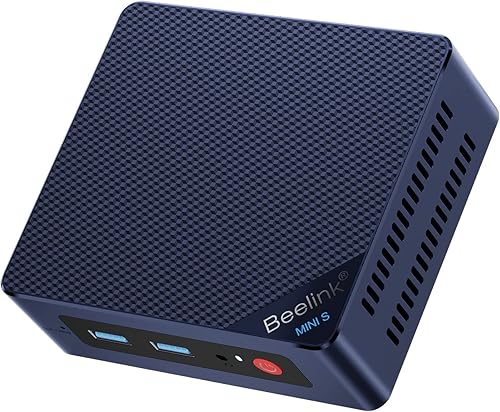
- Intel N95, 4 cores and 4 threads
- 8GB DDR4 memory
- 256GB SSD
- Two HDMI outputs
The Mini S12 has the core parts for web browsing, email and video streaming, plus two HDMI outputs. Its 8GB memory and 256GB SSD keep it focused on lighter use.
Pros
- Two HDMI outputs
- Wi-Fi 6 support
- VESA mount included
Cons
- 8GB memory
- 256GB SSD
The Beelink Mini S12 is a sensible choice for basic browsing, email and streaming. It uses an Intel N95 processor with 4 cores and 4 threads, plus 8GB of DDR4 memory and a 256GB SSD.
Two HDMI outputs let you connect two screens, and the unit supports Wi-Fi 6 and Bluetooth 5.2. Beelink also includes a VESA mount, so you can attach the small computer behind a compatible monitor.
The 8GB memory and 256GB SSD keep it aimed at lighter workloads. That's enough for a simple home setup, but users who work with a large number of open tabs may prefer one of the 16GB options above.
Choose the Mini S12 when your needs are straightforward and you want two HDMI connections. For more storage from the start, compare the Beelink SER3.
Bosgame E2 Plus mini PC: Best for everyday home tasks

- AMD Ryzen 5 3501U, 4 cores and 8 threads
- 8GB DDR4 memory
- 256GB SATA SSD
- Three display outputs
Bosgame positions the E2 Plus for browsing, email, documents and online meetings. It starts with 8GB of memory and supports upgrades up to 32GB.
Pros
- 4-core, 8-thread processor
- Three display outputs
- Supports memory upgrades
Cons
- 8GB memory to start
- SATA SSD rather than NVMe
The Bosgame E2 Plus is built around everyday home and office tasks, including browsing, email, document editing and online meetings. Its Ryzen 5 3501U has 4 cores and 8 threads, paired with 8GB of memory and a 256GB SATA SSD.
It supports three displays through two HDMI 2.0 ports and USB-C video output. The HDMI ports support up to 4K at 60Hz, while the USB-C display output supports up to 1080p at 60Hz.
Bosgame says the memory can be upgraded to 32GB. It also runs Windows 11 Pro and supports Ubuntu, giving you an alternative operating system if you prefer it.
This is a reasonable option if you want an 8GB starting configuration with more processor cores than an entry-level N95 system. Choose a 16GB pick if you want more memory without planning an upgrade.
GMKtec G3S mini PC (8GB): Best for compact two-screen setups

- Intel N95, 4 cores and 4 threads
- 8GB DDR4 memory
- 256GB M.2 SSD
- Dual HDMI 4K output
The G3S is aimed at routine tasks and home entertainment, with dual HDMI outputs for two screens. Its 8GB memory and 256GB SSD suit a modest everyday workload.
Pros
- Dual HDMI outputs
- Wi-Fi 5 and Bluetooth 5.0
- 3-year limited warranty
Cons
- 8GB memory
- 256GB storage
The GMKtec G3S fits a compact desk where browsing, email and a second screen are the main needs. It uses an Intel N95 processor, 8GB of memory and a 256GB M.2 SSD.
Its dual HDMI 2.0 outputs support two 4K displays at 60Hz, and it includes Wi-Fi 5, Bluetooth 5.0 and Gigabit Ethernet. Those connections cover common monitors and home network setups without needing special display hardware.
GMKtec describes the N95 as suited to routine tasks, office work and home entertainment. The 8GB memory and 256GB storage are the main limits for heavier multitasking or a large local file library.
Pick the G3S if you want a simple two-screen computer with an Intel processor. For more memory, look at the Bosgame E5 or a 16GB GMKtec G10 configuration.
What should you check before buying a low-cost mini PC?
Start with the workload you expect to use every day. Browsing and email need less capacity than frequent video calls, dozens of tabs, photo work or a large library of local files.
Check memory first if you multitask, because 16GB gives you more room than 8GB for several open apps. If you mainly use a browser, email and a few documents, 8GB may be a sensible starting point.
Next, match the SSD size to your file habits. A 256GB drive is suitable for a smaller app and file collection, while 500GB or 512GB gives you more local space.
Finally, count your display and accessory connections. If you want two screens, confirm that the mini PC has two compatible video outputs, such as the dual HDMI ports on the Beelink SER3, Mini S12 and GMKtec G3S.
Is 8GB enough for browsing and email?
Yes, 8GB can suit basic browsing and email when you use a modest number of tabs and apps at once. The Bosgame E5 11 Pro, Beelink Mini S12 and GMKtec G3S all start with 8GB.
Choose 16GB if you often switch between many browser tabs, office apps and calls. The Bosgame E5 16GB option, Beelink SER3 and GMKtec G10 offer that larger starting amount.
Should you choose a mini PC with 256GB or 512GB storage?
A 256GB SSD is a reasonable fit if you mostly use web apps and keep files in cloud storage. If you download many files, install several programs or keep media locally, consider a 500GB or 512GB configuration.
The 16GB Bosgame E5 and GMKtec Ryzen 5 3500U option each include 512GB of storage. The Beelink SER3 has a 500GB SSD, while several other picks start at 256GB.
Verdict: which affordable mini PC fits your routine?
Choose the Bosgame E5 11 Pro for a balanced everyday setup with room to add memory or storage. Pick the 16GB E5 if you keep several apps open, the Mini S12 for basic browsing, or the GMKtec G10 for a three-display desk.
For more choices across a broader range, see our best mini desktop computer guide. If you're unsure whether this compact format suits your work, read who should buy a mini PC.
Our top 3 picks at a glance
-
1
-
2
-
3
Frequently asked questions
What is the best affordable mini PC for browsing and email?
The Bosgame E5 11 Pro is a strong pick for browsing and email because its Ryzen 3 5300U has 4 cores and 8 threads, and it includes a 256GB SSD. The Beelink Mini S12 is another option for simpler tasks, while the 16GB Bosgame E5 suits more apps open at once.
How much memory do you need for browsing and email?
For basic browsing, email and documents, 8GB is a sensible starting point among these mini PCs. If you keep many browser tabs and several apps open together, consider a 16GB model such as the Bosgame E5 or Beelink SER3.
Is a mini PC enough for everyday home use?
Yes. The models here are described for tasks such as web browsing, email, document editing, streaming and online meetings.
Pick the processor and memory for the number of apps you keep open, then check that the ports fit your monitor and accessories.
Should you choose more storage or more memory?
Choose more memory if you often use several apps and browser tabs at once. Choose more storage if you keep many files and applications on the computer.
For example, the Bosgame E5 with 16GB has a 512GB SSD, while its 8GB version starts with 256GB.


